










 Inside Track
View All Layers / Specific Layers on the Canvas
If we added the ability to view all layers (or specific layers) at the same time on the canvas/page, there are a few concerns we would need to resolve. Potentially instead of all layers option, it's just a visible/hidden icon for each layer (similar eyeball for showing/hiding takeoffs).
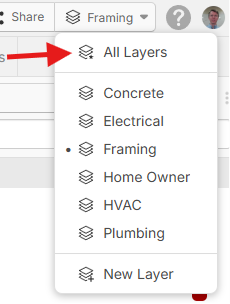
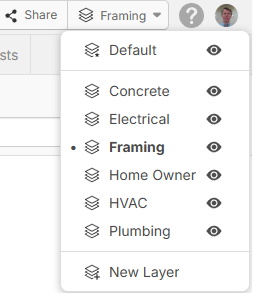
Active Layer vs Visible Layers
We would have to clearly distinguish between the Active Layer and Visible Layers. If there are 5 visible layers, and you create a new takeoff, we need to create the takeoff in the Active Layer. We just need to make sure it's clear to the user which of the 5 is the Active Layer.
Copy / Paste Example
Suppose you are currently in the Framing layer as the Active Layer. Then if you select something from the Concrete layer and copy/paste it, would you expect that the newly created takeoff sections would exist in the Framing layer or in the Concrete layer? Some apps assume that pasted objects always stay in the layer they were copied from by default? Maybe we have special paste capabilities if the user holds shift, or paste As New would past to current layer.
Visibility of Layer Objects
Would you expect all visible layers to display normally, or would you expect only the Active Layer to be full opacity. Maybe the other layers are faded a little (visible but clearly faded like they are disabled)? Maybe there is just an opacity slider that controls visible layers that are not active layer to let you fade them if you want.
The easiest path would be for us to make only the Active Layer editable and the rest of the visible layers read-only with a slider for non-active layer opacity (maybe we start with this and expand as we cover all the "what if" scenarios).
Any input is welcome.
%22%2F%3E%3Ctext%20x%3D%2232%22%20y%3D%2233%22%20text-anchor%3D%22middle%22%20dominant-baseline%3D%22central%22%20font-family%3D%22Arial%2C%20sans-serif%22%20font-size%3D%2226%22%20font-weight%3D%22600%22%20fill%3D%22%23fff%22%3EJ%3C%2Ftext%3E%3C%2Fsvg%3E "Jes")

Maybe it would be simpler if when choosing to view all layers it locks the ability to manipulate your takeoff
👍1
@Luke That would definitely be the easiest for us to implement (read-only if viewing all layers).
@Jes One tricky part about paste to all layers: the takeoff sections are connected to specific takeoffs. Those takeoffs exist on a specific layer. They also have parent/child relationships in that layer (such as parent folders or child items). These connections/relationships would break if only parts are pasted to another layer.

Think future here and put yourself in the trade partners shoes. Future Kyle wants to see trade partners takeoff and also my internal team takeoff. I could care less about "all layers" and like where your second screenshot is headed.
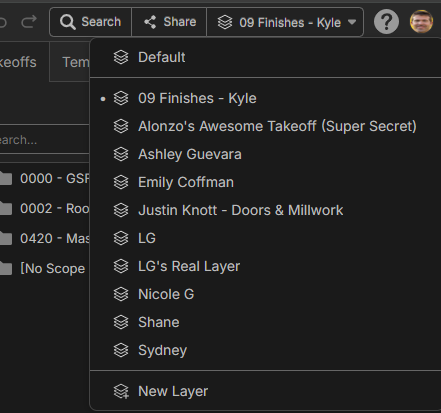
I think we need to ditch the default layer in the future and need to ADD the ability to assign a few critical things before you even start...... trade (could be multiple), ideally unformat, person and company doing it (please sent global defaults, then let us add more custom properites). Right now we only get one name and its the wild-wild west for layer setup, need to help identify what is in that layer.
I like read-only option with only making the active layer editable. My main problem is WTF is in each layer right now.....help us help ourselves stat.......example job I'm on now errrrrrr
%22%2F%3E%3Ctext%20x%3D%2232%22%20y%3D%2233%22%20text-anchor%3D%22middle%22%20dominant-baseline%3D%22central%22%20font-family%3D%22Arial%2C%20sans-serif%22%20font-size%3D%2226%22%20font-weight%3D%22600%22%20fill%3D%22%23fff%22%3EJ%3C%2Ftext%3E%3C%2Fsvg%3E "john")
The problem is that the current use of folders is basically the same as that of takeoff folders. Early on, I had suggested that what we are calling "layers" should function as transparent overlays on which the takeoffs lived. Layers could therefore have certain pages associated with them and visibility of the associated pages could be toggled on/off. There would be no confusion as to which layer was active just as there is no confusion as to which page is active.
Now, if we are going to continue using layers as "views," simply have the default layer function as "All" and create a layer for each estimator/collaborator. Then add the visibility toggle for each layer when not viewing all. Trades can be easily managed using folders. And since there are related posts about layers and permissions, you could create shareable layers that are, more or less, visual versions of the required reports for the intended recipients.
👍1Back on this thread, one region has this down (Screenshot below), and uses their bid leveling sheet identity number as their takeoff layer. Still love the idea above in adding properties to layer, and even to the extent that zzTO puts a global default for people to fill out company, person and scope in the layer boxes.
Side note this Region wants the ability to "duplicate" layers too......granted that is assuming that hyperlinks automatically come thru when you import drawings for that to work.
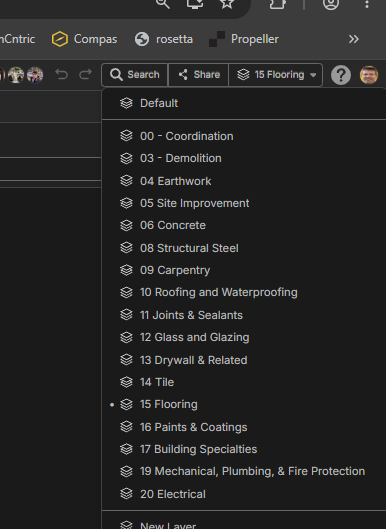
@kyle, kind of a neat idea to choose a custom property that drives the layer division but if the intent is automation (going to the right place without selection) you can achieve this by building this into your templates and using custom group by settings in reports
I do think everyone should get to choose what they are deciding to utilize layers for.
one fix for confusion on layers and the can of worms viewing more than one at a time during a live takeoff is two sets of selections per layer
one being working selection (can only select one at a time )
and 👁️ viewing (select as many as you wish)
👍2%22%2F%3E%3Ctext%20x%3D%2232%22%20y%3D%2233%22%20text-anchor%3D%22middle%22%20dominant-baseline%3D%22central%22%20font-family%3D%22Arial%2C%20sans-serif%22%20font-size%3D%2226%22%20font-weight%3D%22600%22%20fill%3D%22%23fff%22%3EJO%3C%2Ftext%3E%3C%2Fsvg%3E "Jeffery Osborn")
My only comment would be that the takeoffs are global in the layers, if I make a new takeoff item it should be visible on all layers, right now I use layers to do project area breakdowns so I can generate separate pricing for different areas of the project.
👍1

Setting layers aside for a moment, I think zz would benefit from separating visibility from organization. Rather than relying on layers to control what is displayed, each takeoff item and every roll-up level could have its own visibility toggle (eye icon), allowing users to show or hide any portion of the takeoff tree independently [taking a play out of Autodesk Takeoff].
This would significantly reduce the pressure on layers, which today are often being used as a workaround for filtering combinations of scope, estimator and other properties. Instead, users could filter on metadata while independently controlling visibility, making review and QA much more flexible.
Layers could then evolve into property templates rather than visibility containers. Activating a layer could automatically assign common attributes such as scale if there are different scales on a page, but more helpfully multiples, group, floor, location, bid package or other default properties, eliminating repetitive data entry on every item when all takeoff on a page might have common consistent properties while keeping takeoffs consistently organized.
I’d also like the ability to filter by any property (Scope, Estimator, Bid Package, Floor, Phase or custom fields) and batch export all associated drawings into a single bookmarked PDF. While shared links are valuable, contractors will continue to rely on PDF packages as formal records for estimating, trade reviews, procurement and basis-of-cost documentation. That workflow isn’t going away, and generating those packages directly from filtered takeoff data would be a significant productivity improvement.
👍1To answer your specific questions
Active Layer vs Visible Layers
I like the second screen shot with the dot and bold letters with the eyes showing they are all visible but the active layer is the framing.
Copy / Paste Example
I think if you copy and paste on an active layer it’s intuitive to assume that the paste is to the active layer. It would be nice to copy from an active layer, make a different layer the active layer and paste to the new active layer. Paste to all layers might be interesting but unwieldy.
Visibility of Layer Objects
By default it would be great to have the active layer full opacity and all other layers more transparent. I love the idea of having a slider that if you wanted to make the non active layers full opacity (or maybe even more transparent then default) you can.
I like the active layer being the only editable layer. As long as it’s easy to jump into another layer and make that layer the active layer.
… all of these will help manage the chaos that can happen on large collaborative projects. I look forward to seeing some of this developed!
👍1%22%2F%3E%3Ctext%20x%3D%2232%22%20y%3D%2233%22%20text-anchor%3D%22middle%22%20dominant-baseline%3D%22central%22%20font-family%3D%22Arial%2C%20sans-serif%22%20font-size%3D%2226%22%20font-weight%3D%22600%22%20fill%3D%22%23fff%22%3EVT%3C%2Ftext%3E%3C%2Fsvg%3E "Victor Tengowski")
Active Layer vs Visible Layers
I like the second screen shot.
Copy / Paste Example
I think it should paste to the current active layer. We are currently using layers for managing estimate breakouts since the section properties update interacts oddly with manual takeoffs. I also see value to takeoff section layer management (i.e. being able to move/copy/cut/paste takeoff sections from one layer to another via right click menu). I wonder if it would make sense that if it a takeoff is created/modified in one layer that is done in all layers 'behind the scenes' and only becomes 'visible' on a specific layer if the user pastes/moves it into that layer.
Visibility of Layer Objects
I think it would be beneficial for users to have other layers visible on the sheet, but maybe grayed out or colors washed out. If it was colors are faded/or washed out the color selector needs to be reworked a bit. Heck, it kind of already needs to be reworked a little bit. The colors that are 4 - 6 rows of the color selector can be perceived too similarly. Same issue with the top row. I think I would almost prefer other layers be grayed out. I think that section selection might also need some work so users can cycle through the sections stacked on top of each other without having to move/hide them.
Further, I can see value to editing sections on other layers. During QTO review you might notice that a section is double counted and you want to delete it. Or maybe you were sloppy at first and need to edit it. Or a revision came out and you want to edit a bunch of sections without flipping through the layers. This can come later, but it should come eventually.
👍1