Q & A
Q & ASharing zzTakeoff to a jobsite
Does anyone have a good workflow for sharing zzTakeoff with someone in the field at a jobsite? Typically, I would only want to share one sheet or one detail with them in a read only mode. They will most likely use their phone to view what I share so I definitely do not want to share a whole project.

Hi, we do want to add more sharing options! As a workaround you can copy the page to a new project, and then copy the takeoffs to the new page on the new project, then share that project in viewer mode with a user in the field.
👍1%22%2F%3E%3Ctext%20x%3D%2232%22%20y%3D%2233%22%20text-anchor%3D%22middle%22%20dominant-baseline%3D%22central%22%20font-family%3D%22Arial%2C%20sans-serif%22%20font-size%3D%2226%22%20font-weight%3D%22600%22%20fill%3D%22%23fff%22%3EDJ%3C%2Ftext%3E%3C%2Fsvg%3E "Doug Jones")
@Stephen Does this workflow share real-time live view or is it snapshot share?
%22%2F%3E%3Ctext%20x%3D%2232%22%20y%3D%2233%22%20text-anchor%3D%22middle%22%20dominant-baseline%3D%22central%22%20font-family%3D%22Arial%2C%20sans-serif%22%20font-size%3D%2226%22%20font-weight%3D%22600%22%20fill%3D%22%23fff%22%3EJO%3C%2Ftext%3E%3C%2Fsvg%3E "Jeffery Osborn")
@doug I think what you can do it right click on the plan and then do a copy URL, and then copy that into a email, it will open that 1 drawing only.
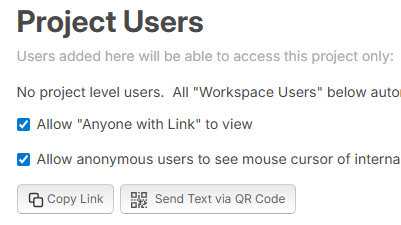
👍1This method works perfectly to quickly share takeoffs, note, annotations, cursor positions with field personnel in real time. No zzTakeoff account is required for the person you send this to, just click the link then discuss and annotate your topic.
Goto your users window > in the Project Users section select the 'Allow "Anyone with Link" to view' & "Allow anonymous users..." checkboxes > select Send Text via QR Code
A window will open prompting for the phone number of the person you want to send a link to. Enter the phone number and a QR code link for that project will be created. Then scan that QR code with your phone and it creates a text message for that person for that project.