










 Q & A
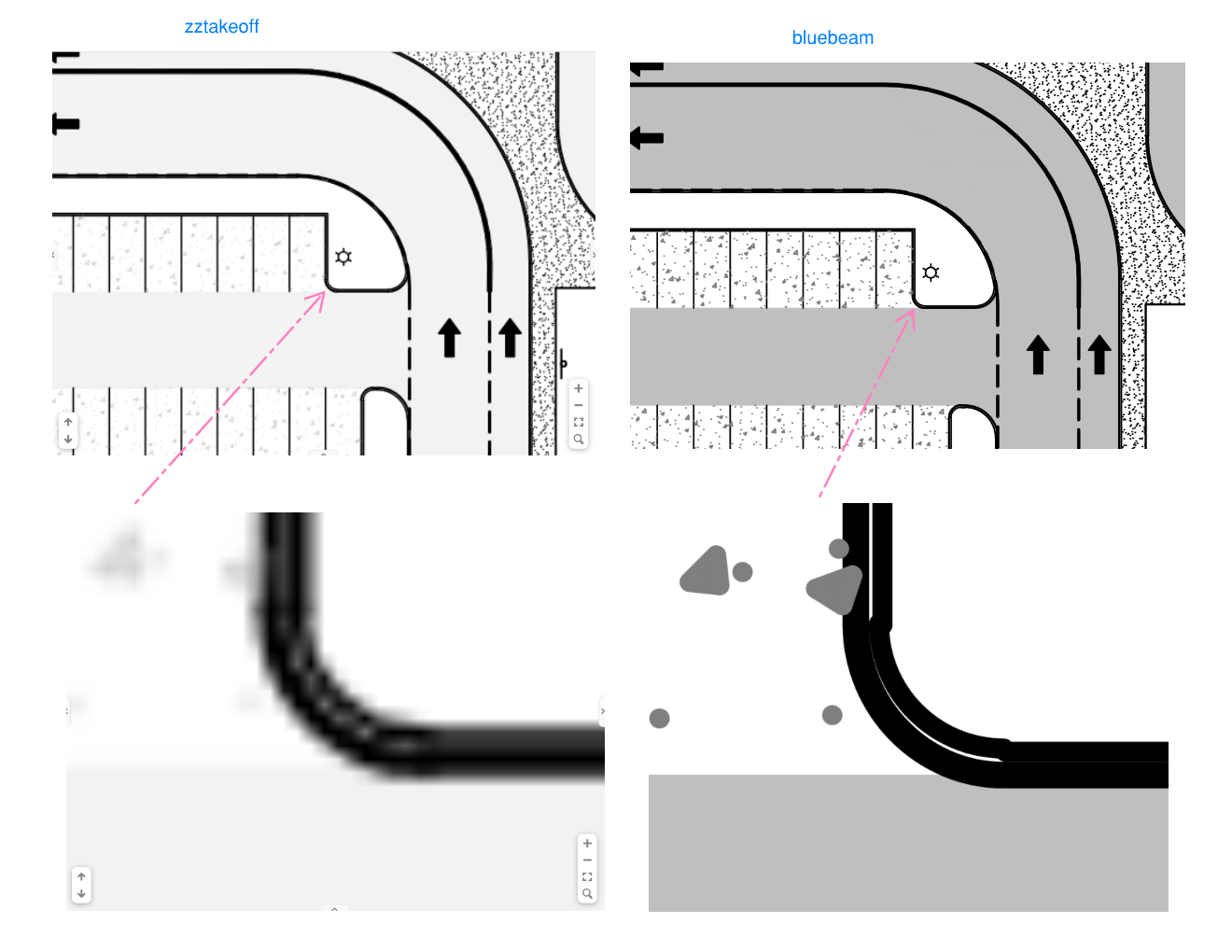
Q & ANeed better resolution. Any tips or tricks to get that?
Not worried about the gray coloring. I can upload with OST, Pswift or Buzzbid for comparison as well. Bluebeam was just the easiest. Thanks

Hi, can you share the pdf file with support@zztakeoff.com ?
%22%2F%3E%3Ctext%20x%3D%2232%22%20y%3D%2233%22%20text-anchor%3D%22middle%22%20dominant-baseline%3D%22central%22%20font-family%3D%22Arial%2C%20sans-serif%22%20font-size%3D%2226%22%20font-weight%3D%22600%22%20fill%3D%22%23fff%22%3EJR%3C%2Ftext%3E%3C%2Fsvg%3E "John Reily")
Yes, just emailed it.
Can you try turning up your DPI settings on import?


I'm currently not seeing that option. Is it currently functioning?
Ok, I found the option. The gear icon doesn't appear until you move your cursor close to it, and it's very small.
It might be beneficial to make it more prominent and is there a way to add a "batch" function, so we don't have to do each drawing one at a time?
I understand you might not want to do every drawing in a set but if we can hold down Control and select multiple files at once that would be helpful.
This did not fix the resolution issue. Picture above is with the DPI adjusted and not much difference.
The resolution is so much better! You can't see them side by side, but it's way clearer now. I honestly don't think there's a way to get the raw PDF to show up on screen the way you're hoping for. There's a pretty big difference between vector graphics and rasterized graphics, and that's basically what's going on here. A PDF can be zoomed in forever without losing quality because it's a vector graphic, while a PNG is locked to a specific DPI when it's rendered.
%22%2F%3E%3Ctext%20x%3D%2232%22%20y%3D%2233%22%20text-anchor%3D%22middle%22%20dominant-baseline%3D%22central%22%20font-family%3D%22Arial%2C%20sans-serif%22%20font-size%3D%2226%22%20font-weight%3D%22600%22%20fill%3D%22%23fff%22%3EJ%3C%2Ftext%3E%3C%2Fsvg%3E "Jes")
I didn't know that zz converts the pages into PNG/TIFF files similar to what PS used to do. I thought it working directly off PDFs this whole time. Interesting.
This is the reason the system is requesting a DPI
What does the platform do with the PDFs after the PNGs are generated? Does the AI still use the original PDFs to do its OCR and things on the backend? Or it works off of PNGs too? Also, would increasing the DPI on uploads help with the AI's OCR?
Btw, can they add the option for users to delete the original PDFs from their cloud storage and only retain the zz generated PNG files? (This is really just for cleanup purposes of old projects that weren't won)
Hi, we store the pdf vector details client side for searching with the Search tool. There is a separate AI OCR that runs when you smart select an area to copy text, and that does use the image data. Usually DPI doesnt effect it too badly as OCR is great a text, and DPI usually fixes other clarity issue. I'm not sure about deleting PDF files, is this something you would want to do regurarlly?
