










 Q & A
Q & ACost code Changing
Has Anybody had any luck with the Cost Code being automatic in a formula
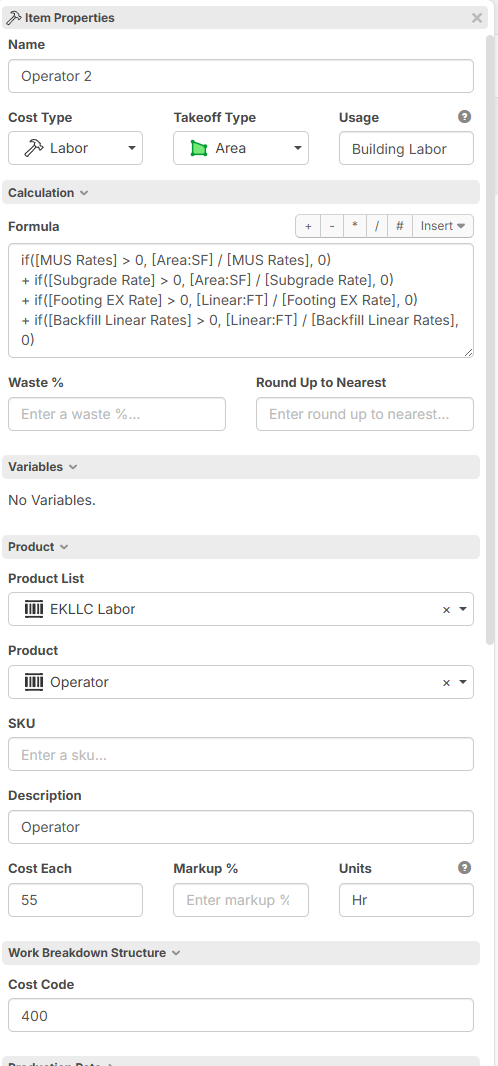
For instance i am working on fine tuning my templates and when I switch the product to apply in the template so my labor rates can be updated in 1 place if i switch the product it erases the cost code. Or if i were to drag and drop an item i.e. operator 2 into a new takeoff to make a new template then It can Auto populate the code but as i am typing this out i realize it may need a couple of variable to select from like the grey folder i have for which section it is in and then what kind of item it is so it can put it all together l
IE if grey folder is Building then the labor would be 400 and equipment would be 401 and material would be 420 etc. That wouldn't work either due to the amount of codes i have. Any Ideas would be helpful

We also have a long list of accounts ting codes and kind of excited to try this too. Our codes always start with something similar for LMESO like you it sounds, then it’s another combination of numbers.
have you watched Todd’s inherit boot camp? That would be my approach to auto code it if I had to do it now.


I use inheritance on most of my templates

Hi, using inheritance for a custom property does allow setting it on a folder, and having the value carry down to takeoffs/items. You just need to setup the customer property with all these details. Can you share your custom property setup?

Hi Chris, here is an example of what you are trying to do... hope this helps someone
if("[Cost Type]" == "material",10,0)+if("[Cost Type]" == "labor",20,0)+if("[Cost Type]" == "Equipment",30,0)+if("[Cost Type]" == "Subcontractor",40,0)+if("[Cost Type]" == "other",50,0)
You can change the 10,20,30 etc as needed
This way if your cost type is labor is will use the 20 as the code and if your cost type is material it will use the 10 code.... and so on..
Thanks Todd