











3d 8h
Free Rotate?
Under Review
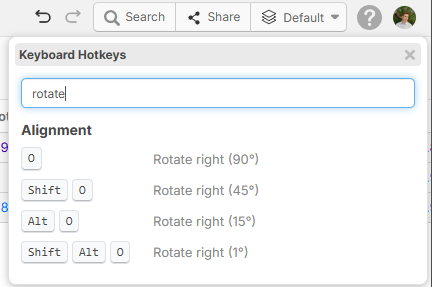
I see there is options to rotate, but how about to rotate at any angle?

Hey Jeffery! We have hotkeys to rotate in 90, 45, 15, and 1 degree increments. Is this what you're after?
%22%2F%3E%3Ctext%20x%3D%2232%22%20y%3D%2233%22%20text-anchor%3D%22middle%22%20dominant-baseline%3D%22central%22%20font-family%3D%22Arial%2C%20sans-serif%22%20font-size%3D%2226%22%20font-weight%3D%22600%22%20fill%3D%22%23fff%22%3EJO%3C%2Ftext%3E%3C%2Fsvg%3E "Jeffery Osborn")
Jeffery Osborn 2d 16h
I gues thats fine for now, I more thinking of having a rotate in the right click menu, there is rotate left, right, mirror, then if we just have a rotate, then we can free rotate the item instead of an increment at a time.
👍1
Trenton Pearce 2d 14h
I agree with this and I assume you are looking for something similar to bluebeam? Instead of hotkeys/right clicking, you can grab the "0" degree point of the drawn item and rotate it up to 360 degrees.
🚀1Jeffery Osborn 2d 14h
Yes or even how its done in On Screen Takeoff, I can rotate in place freely.
🚀1
Shawn M 2d 13h
Like this??
Shawn M 2d 13h
ahhh, okay
You must be logged in to post replies. If you don't have an account you can signup here.