










 Feature Requests
%22%2F%3E%3Ctext%20x%3D%2232%22%20y%3D%2233%22%20text-anchor%3D%22middle%22%20dominant-baseline%3D%22central%22%20font-family%3D%22Arial%2C%20sans-serif%22%20font-size%3D%2226%22%20font-weight%3D%22600%22%20fill%3D%22%23fff%22%3EJO%3C%2Ftext%3E%3C%2Fsvg%3E "Jeffery Osborn")
Collaspe / Expand
Can you add or update to include expand and collaspe for only a folder? Right now it looks like the collaspe does the entire structure.

Good afternoon,
I had been thinking about that as well. One option I would like to see is for the default to be collapsed in templates when you first open them. That way, you can open the folder you need first and not have to collapse all the others to start.
👍2
Thanks for the input.
@Rick You can have your templates start as collapsed by default if you click the "..." menu and set the "Default Expand Level" to "None":
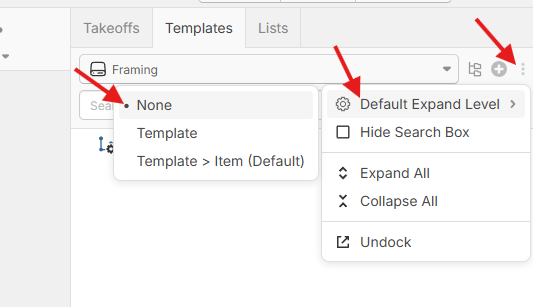
Thanks, Heber! We are always learning. I appreciate all your help!
🙂1👍1You're welcome 🙂 Yes, we're all learnings as we go. Lots of good things ahead.
👍1
I would also love to see the folders on the pages side also be able to collapse one folder at a time. On top of that could you please look into not having all the folders automatically expand on the pages or takeoffs when the window refreshes or you open a new window? That can get annoying when you're working on a few pages by each other that are not at the top and the folder keeps expanding.
👍2