










 Inside Track
Ready to Test: December 2025 Release with a Ton of New Features
We just deployed the latest beta to our TEST server. If you have time, please test it out and let us know what you think. For bug reports in this Beta, please respond to this post, and we'll get them fixed.
Fun fact: this release has over 41,000 lines of added or updated code.
Here is a quick list of features added. We will be creating a more complete and detailed list with screenshots and videos before the official release.
Dark Mode
- Ability to toggle the UI to dark mode, and also separately to invert plan colors.
Project
- Custom Properties at the project level
Pages
- Plan Versions / Plan Sets when uploading (we still have lots to add, but we have a good start)
- Properties for - Revision, Date Issued, Date Received
- Auto name & scale all pages with AI when uploading new files
- Auto move/copy takeoff data to new versions of pages
- Plan Review popup after uploading pages to verify page names/scales
- Plans Tab (Thumbnail View)
- When collapsing pages sidebar, a dropdown for pages is visible in toolbar
- Option to Rotate Page 180
- Snap to corners of page
Takeoff
- Box Mode while doing area or linear takeoffs
- Properties - Auto Name Mode, Formula Mode, Text with Tags Mode, Inherit Mode
- Manual Area, Linear, Count - ability to enter SF, LF, etc. manually
- 10 total count symbols (more coming in the future)
- Symbols for point counts show in the legend
- Scaled checkbox on point counts
- Properties on folders
- Bulk Update on multiple selected takeoffs or items (right click menu after selecting)
- Paste as New
- Duplicate As (including for cutouts to fill them in)
- Dimension Tool - option for sloped
- Cloud Tool - box mode by default
- "+" button to add items on the fly in properties popup
- Item variables inherit by default from takeoff and can now be switched to formula mode
- Merge Areas
Formulas
- [Wall Height.FT], [Wall Height.IN], [Wall Height:Dimension] - better formatting
- Formula mode available for most properties
- [../../Area] - traversal using [..], [./Sibling Item/Some Property]
- Inheritance with [^/Some Property] or "Inherit" mode in property gear menu
Custom Properties
- Default Mode / Default Value
- Inherit Mode
- Ability to "Exclude from Group By Options"
- "Hidden by default" option (apply when needed using the gear in the properties title bar)
Annotations
- Ability to create presets in ribbon bar (caret in upper right of tool button)
Reports & Worksheet
- Worksheet / grid across the bottom available while in takeoff tab
- Properties - accessible in right click menu
- Easier to edit properties directly from reports grid
- Left sidebar is collapsible in reports - shows a dropdown for report views in toolbar
- Ability to search
- Column settings - display name & export name for each column (nice for customizing CSV exports)
- Custom icon option for each report view
- Items no longer require a parent to display in reports
- Option: Include takeoffs with no sections
Sidebars
- When clearing search, restores expanded/collapsed state
- Search gray folders in sidebar (grouped by properties)
Hotkeys
- Spacebar for Quick Search / Start Takeoff or Template
- / Slash hotkey for tools & commands
- Enter - start/stop takeoff
- Alt + S - Snap
- Alt + P - PDF Snap
- Alt + W - Ortho
- Alt + A - Auto Scroll
Colors
- Bigger color palette (5X)
- Predefined color sequence and no re-use of existing colors when picking a random color
Mobile
- Search
- Ability to show legend
- Drag popups
Performance
- Speed improvements
If you don't currently have access to our TEST server, and you're interested to play with the latest, you can Request Test Server Access.
Thank you for all your feedback to help zzTakeoff get better each day 🙂

This is great! I'm playing in the test environment now. 2 Topics:
Topic 1 - Love Box mode......but need ability to toggle between box mode and point and click, sad we even have to toggle tho.... to bad it was not just defaulted to holding down the mouse is box mode, doing one click is point and click. (at minimum we need a hot key to toggle!)
Topic 2 - Project Overview screen:
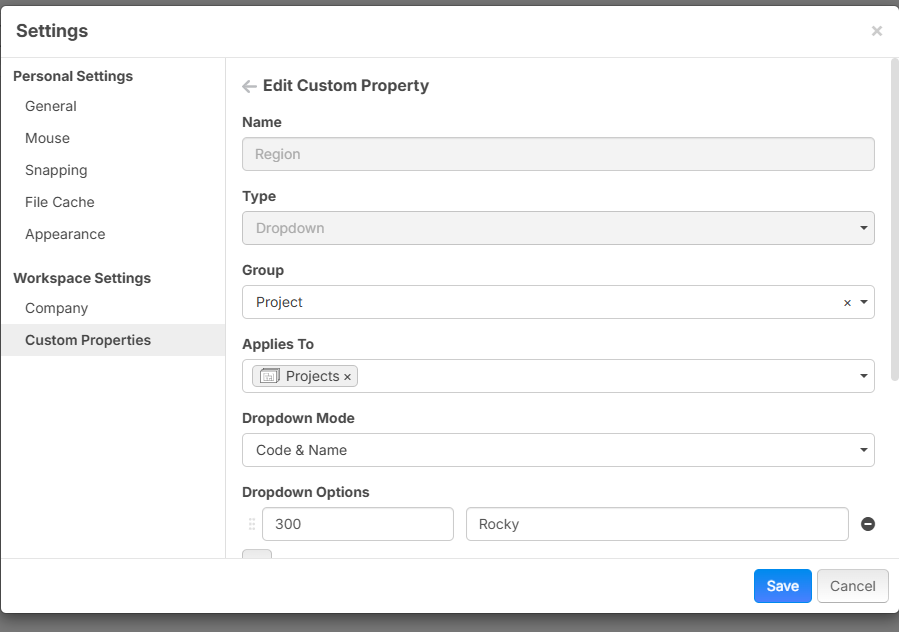
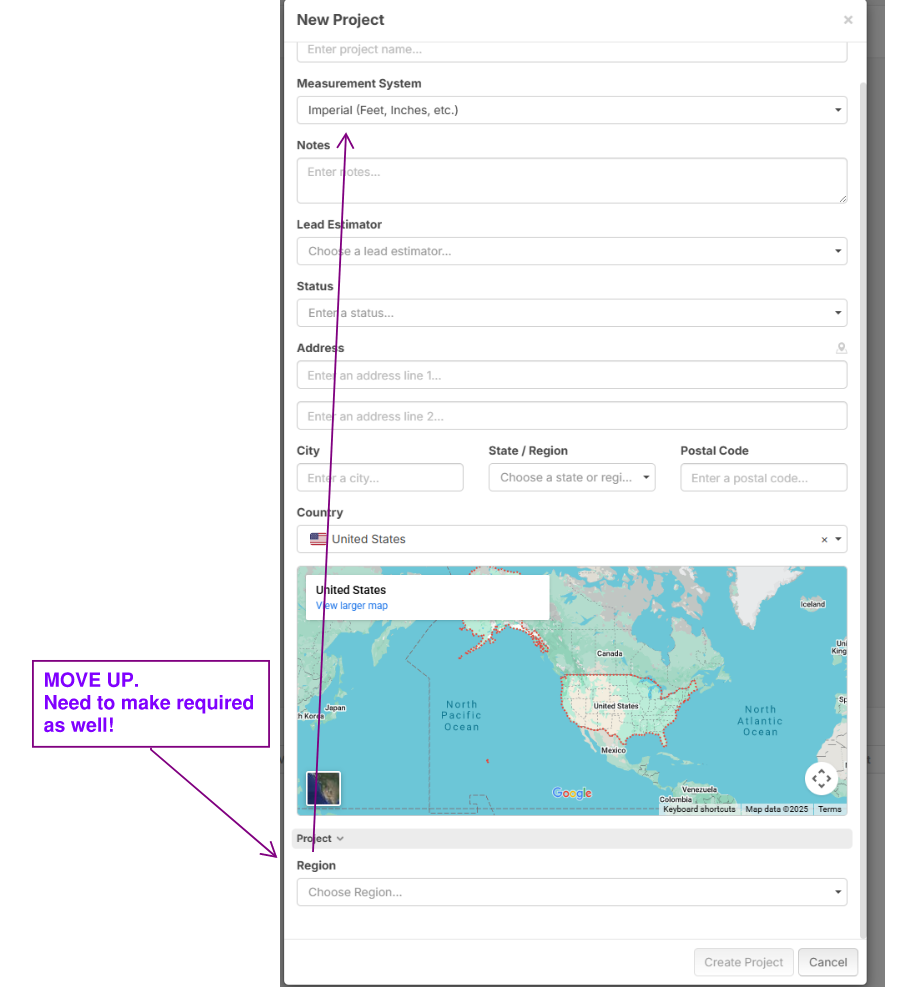
One thing I see is the ability to add custom fields to projects, example we need to put region on every project! Couple requests here:
1. There is NO WAY to sort your "open projects" list by region now. Need a group by field in the projects list now.
2. Need to make this required, or have the option to make it required or not.
3. Need to make it by default sorted by project for entire company, so they land in a consistent spot sorted by region.
4. Its hidden below map. Please take off the map would be my first request. Or if possible let us control where this lands. (screenshot 2)

please please please add abilty to change naming conventions to match inputs on [Width] ex [Width:IN]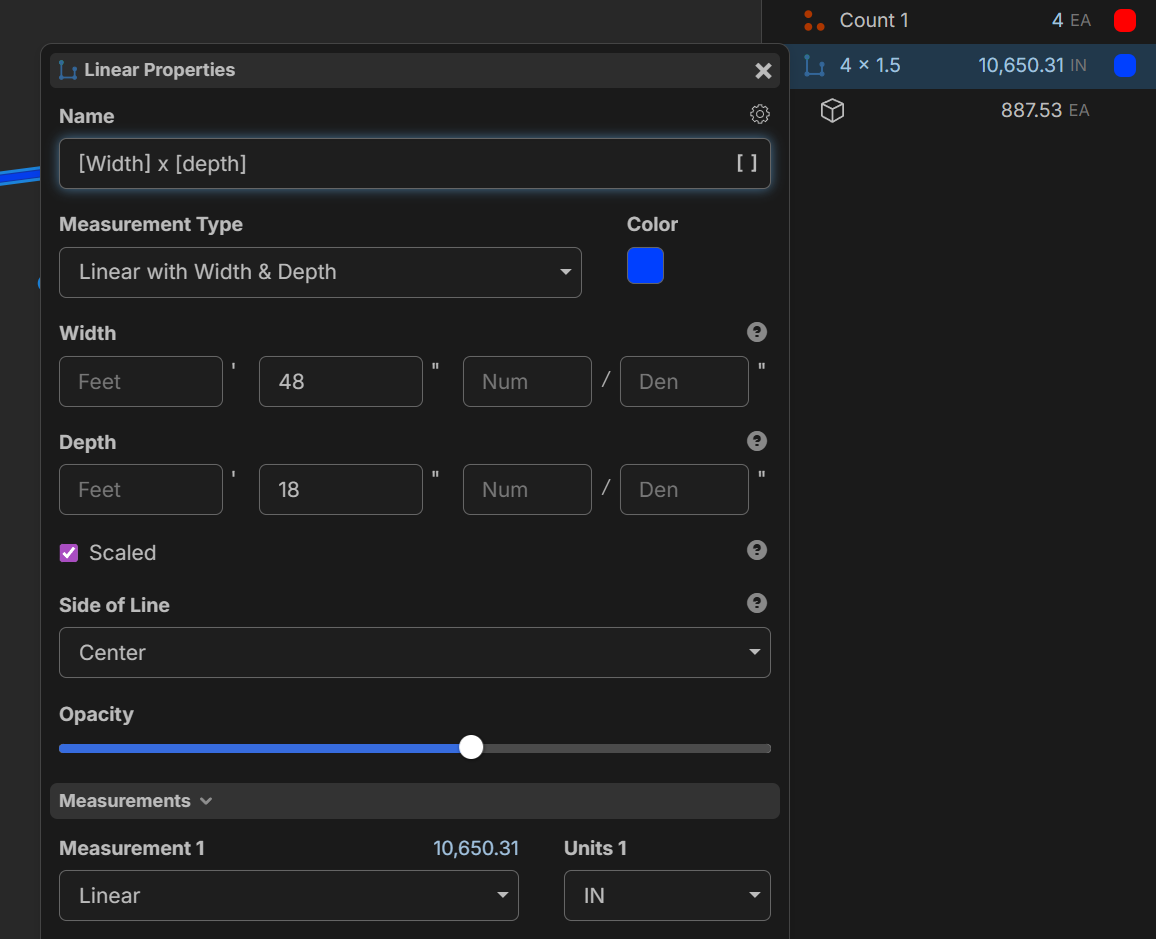
for now, does anyone know a way to use formula mode in a way that would allow me to make some separate calculations and some words in the middle? or after
example: ([width] * 12) by ([Depth] * 12)
@Luke Here is a 54 second video doing what you are asking! Note this release is sounding like its coming in hot, like 1st week of 2026, so stop working till then :) I'm going to do a major overhaul to our templates when it drops.
Hi Kyle, i appreciate your response and its definitely an improvement. and it might sound like a funny request but with the things I'm typically taking off they are displayed in inches only regardless of it being larger than 1 ft. in this specific circumstance I'm talking about HVAC duct dimensions. Since I'm in Canada these dimensions are always displayed in drawings as either inches or millimetres.
yes I'm not building anything just yet, only testing mostly to see how i can build what i want with the new features once its officially dropped.
thank you!
👍2
Hi Luke,
Kyle shows a great way of doing this using [Width:Dimension] and [Depth:Dimension]
You can also do it using [Width.In] and [Depth.In]
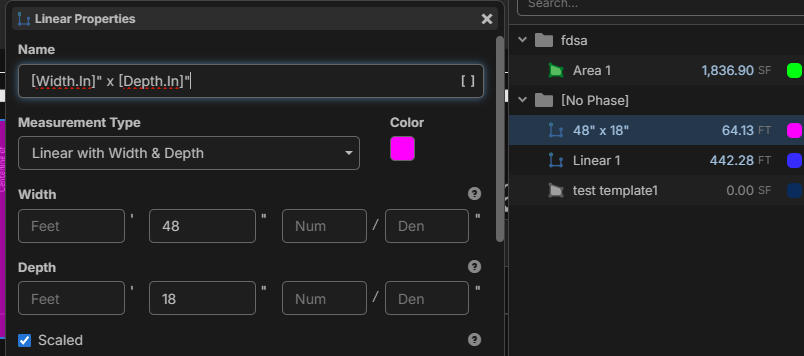
Note: using the ".In" will pull only the value entered in the inches field. So if you have 1 entered in the feet field and 6 entered in the inches field, this would only return a value of 6. (not 18")
In your case, you entered 48 in the inches field, so it will return a value of 48. Just something to be aware of.
😎1
@Kyle There is a hotkey "Tab" to toggle box mode. We'll get these better documented. I like the click & drag for automatic box mode, too. That could be cool since maybe both point & click & box mode could be active at the same time. For areas, that could be good, but for linear takeoffs there may be a conflict since click & drag can do individual lines (but we could easily give settings for this).
On the projects page, we are planning to add the same "group by" capabilities that we have in the takeoffs, so that will be coming. I like the idea of a required field. We will discuss internally on that.
Thanks for the input on the map, etc. We'll discuss and improve it. Also, thanks for that demo video on the dimensions in the name. This will be a lot of fun with the additional flexibility in this new update.
@Luke In a future release we will also have a [Width:In] separate from [Width.In]. The "." will extract a specific property out of the dimension, and the ":" will be more of a conversion.
Suppose you have 5'-6" width:
[Width.Ft] -> 5
[Width.In] -> 6
[Width:Dimension] -> 5'-6"
[Width:Ft] -> 5.5 (not implemented yet)
[Width:In] -> 66 (not implemented yet)
We will also be adding other conversions as well. 🙂
EDIT: maybe we should rename [Width:Dimension] to [Width:Text] instead. Just thinking out loud.
👍5❤️1Are you seeking test server folks to report bugs found? If so is there a specific place we should? I found one litle guy, the thinking animation keeps spinning after scaling. refreshing the page makes it go away. operationally its working. also a question is
"Start" the new "+ section" when right clicking an old takeoff? is there any operational difference?
@heber im happy with width.in for the moment since it takes all my inches from the box regardless of how many inches are there
👍1@Luke Reporting here is fine for now since we don't want to report bugs for this Beta in our main Bug Reports channel. Down the road we'll have a designated spot, but here is fine for now.
We have not been able to reproduce the spinner getting stuck visible while scaling, but we will keep testing. Yes, the "Start" green dot has the same functionality as "+ Section" when starting takeoff. During takeoff, "+ Section" is a separate option after you've clicked at least 3 points on an area for example to start a new section.
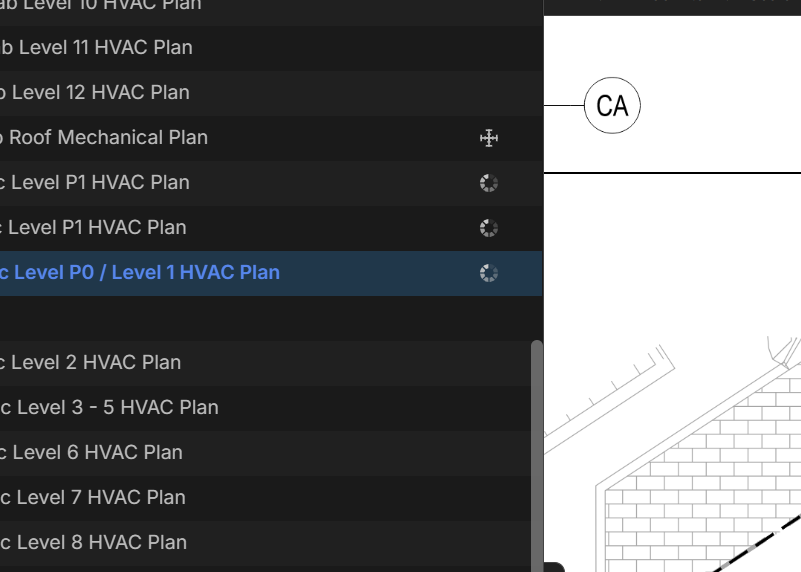
@Heber. Love the ability to re-name the column headers on the export, this is going to be AWESOME to send data to other tools.
One hurdle tho is we need ability to just export the "code". For example uniformat the report tabs gives the full name in "A1010 - Foundations" when Ediphi requires only the code.
Here is a 2min video overview of this using the TEST Enviro. LINK
👍2👏1💯1@Kyle Thanks for the video explaining the export issue. Regarding the "Takeoff" not exporting, because you are grouping by takeoff, you would want to hide the "Takeoff" column and rename the first "Group" column (which is the takeoff) to "name". I think that should fix that part for you. Then regarding exporting the code only for UF3, I will discuss with the developers here and we will come up with a way to do that.
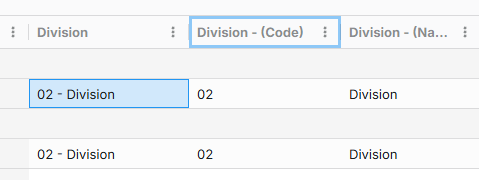
👍1@Kyle we just deployed a patch to the TEST server that shows additional columns if the custom property is a dropdown that has Code & Name. I'm thinking this is the last missing piece to get your export working for Ediphi.
For example, if you have a dropdown for division, you will see Division, Division (Code), and Division (Name).
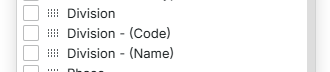
Additional columns in the grid:

auto name hybrid?
wondering if we could chose which items get listed in auto name? testing a few things. I've found i can hide parts i don't want listed by making them child items, which is great but what about a checkbox = false item that has zero value could that be hidden by default? could that also not show up in reports if value is 0?
also it would be great if i can auto name with parts but also add a descriptor using a custom property without having to add it to my item that would make my item list cleaner and still allow me to see what items are being used for in my takeoff

Hi,
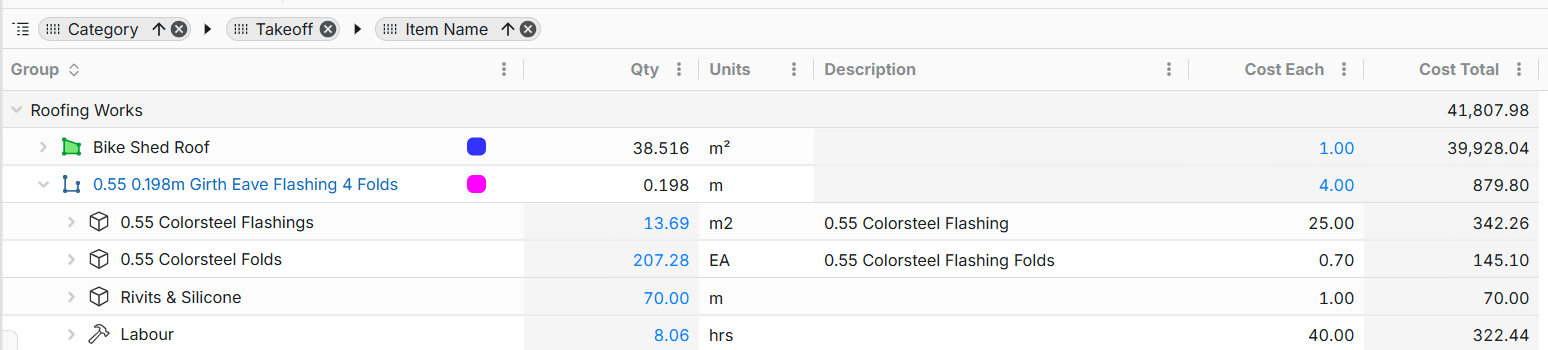
Has anyone work out how i can display my report to show the parent quantity.
eg. 0.55 .198m Girth Eave Flashing 4 Folds qty 69.094m
below is my current setup

@Brendon,
Amazing you can do more parent-child relationships..oh boy. Yeah I've also had that same question in the regular environment to view the parent and the child in one screen in the reports. Here is a 3min vid on a few cool things along with this reporting issue for some ideas for zzTO to make it better. LINK
@zzTO Team:
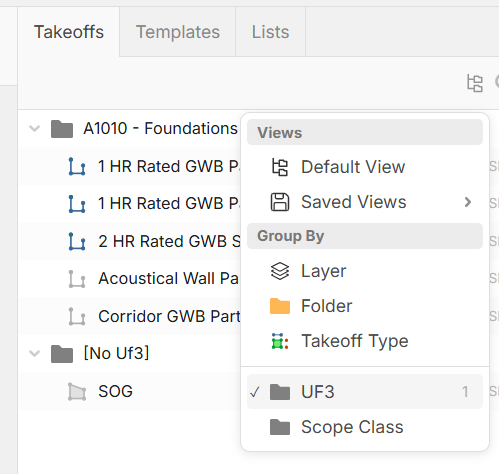
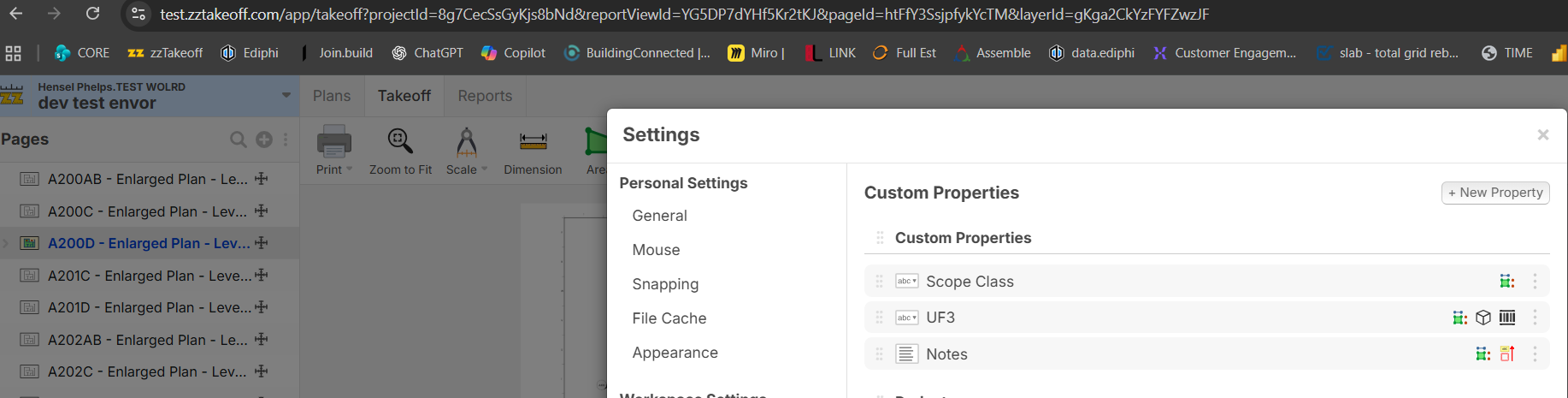
Was hoping to control the order of the "group by" grey columns. On the left UF3 is at the top, but when I go to the settings Scope class is at the top. Can we let the settings control the order is the ask.
@Heber,
The "Enter" Button is amazing! This is going to make the folks coming from OST not get annoyed with that little green/red dot! Love it.
One suggestion now that we have the enter button ability is to remove the "N" key, as the enter button replaces that now.
👍1@Heber,
Wait the enter button is way to far away for my left hand, I'd vote to keep the "N" button and not use the enter button after further testing. The "N" Button also works the same as the enter button, so now I love the "N" Button :)
The only difference now between the "N" and the "Enter" is the enter button ends the takeoff, I think whoever thought of this setup is brilliant. Keep it as is!
👍1@zzTakeoff Team,
Few items that would make the future estimators happy shown in this 3 min video. LINK
1. Make search on the lowest level of the grey folders.
2. Make the "Space Bar" sorted by whatever you have on the right pane.
@Kyle Thanks for the feedback. Sure, we'll expand to allow the gray folder sorting in the popup when you hit spacebar (show similar views as in the right sidebar). You can also use Space or Esc (similar to Enter) to stop the takeoff, too (to avoid going over to the right side of the keyboard for enter). So if you like N to start, you may want to use Space to stop.
Tip: when you hit space to show the quick search, you can also hit space again to toggle between tabs in the popup (if the search text is still empty).
1. Space - Takeoffs
2. Space, Space - Templates
3. Space, Space, Space - Tools (also / is a shortcut to go straight to tools and we will have more commands here as well in the future).
👍2Few questions, more for learning than anything.
- Can someone explain or show a short video on what are the differences of these commands?
- Text with Tags, Formula, Autoname, and Inherit mode. (I have not located Inherit yet tho)
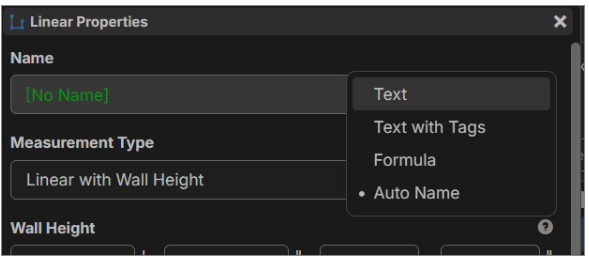
- I'm trying to figure out a use case when someone would use the above properties on the yellow folders, any use cases someone can explain?
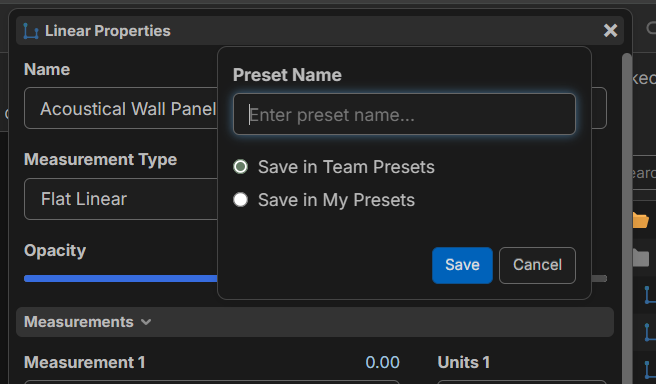
- When I save a PRESET property (cool new feature) for my team, everyone can see it. Is this a admin-only ability for team? Otherwise this will become messy fast. I hope this also applies to all projects?

Team, I just watched the video that Todd and Derek made before reading all of these comments. I don't have access to the test server, so I was unable to verify this. I have a couple of questions for you. The first one may also help clear up a question that someone else posted earlier - LINK
- For the Auto name & scale all pages with AI when uploading new files function
- This now happens automatically, correct?
- Can we "Bulk" delete pages from the preview screen as well?
- Not everyone will need and/or want the "full set"
- Can the plansheets be added to folders automatically based on the set (e.g., anything labeled "A" goes to the Architectural folder, anything labeled "C" goes to the Civil, etc)
- Maybe the folders and organization can be pulled from the Cover sheet/legend?
- Auto move/copy takeoff data to new versions of pages
- Where I want to maintain my "original" quantities, can I paste this data to a new layer and/or new folder?
- Then I assume that I can pull a report to show me the differences between the takeoff data.
Good things are happening. I appreciate all that you are doing to make this better for all, and I can't wait to have this go live!
👍3
Regarding the release date for the latest update: we're making various bug fixes and doing lots of testing to make sure the numbers are right. This is not set in stone, but my gut feeling for release date would be the end of next week unless we run into any issues that take longer than expected to fix. We'll keep pushing. Thanks for all the feedback and testing.
👍5🤞1@Rob
Good luck talking to your boss. Hope this short video gets you pumped up! LINK
🚀2🔥1😂1
Regarding Colors:
Thank you for expanding the color palette.
However, although there are technically more color options, many of them still appear nearly identical. The issue is that saturation is not adjustable.
Color picker from the update:
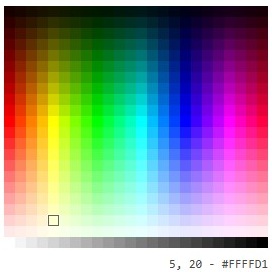
This gives you hues (colors) with different values (brightness).
Color picker from Plansiwft:
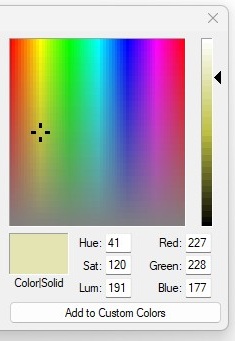
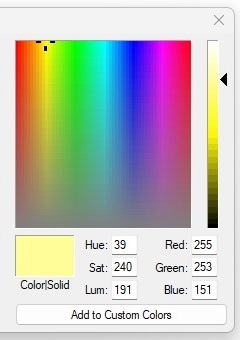
This gives you hues with different saturations (intensity), then the slider on the right adjusts the value.
The second method provides thousands more color options. I'm not sure if the predetermined swatches rather than a gradient selector was chosen for a specific reason, but if swatches are necessary, there could still be a two step process to provide more colors.
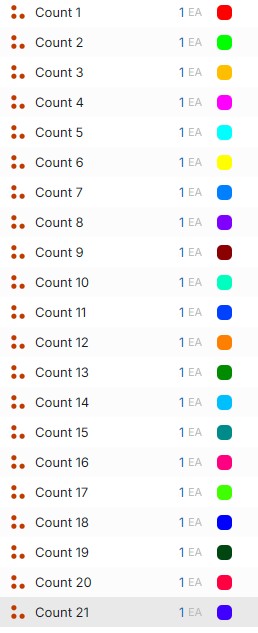
I tried the "Predefined color sequence" and it works fairly well. But while the colors are technically different, some of them would be indistinguishable if they are next to each other on the plan or by looking at them in the list.
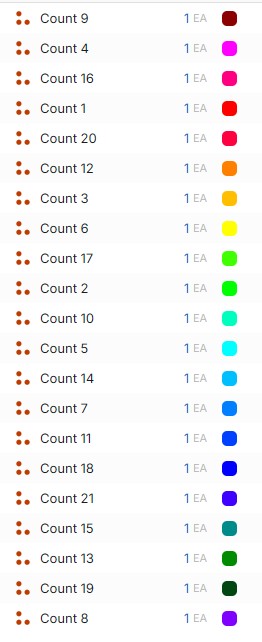
%22%2F%3E%3Ctext%20x%3D%2232%22%20y%3D%2233%22%20text-anchor%3D%22middle%22%20dominant-baseline%3D%22central%22%20font-family%3D%22Arial%2C%20sans-serif%22%20font-size%3D%2226%22%20font-weight%3D%22600%22%20fill%3D%22%23fff%22%3ECW%3C%2Ftext%3E%3C%2Fsvg%3E "Casey Wilson")
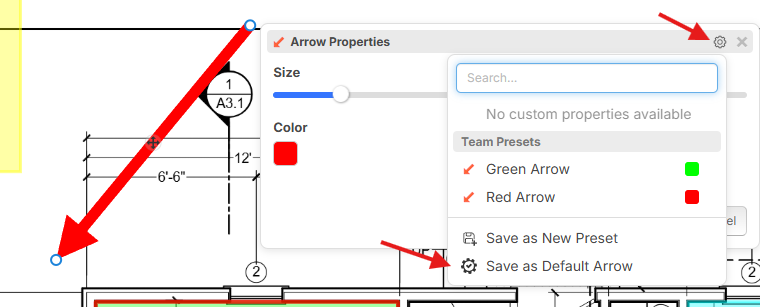
It would be nice if the highlighter defaults to the last color used. Currently we have to chose the color we want to use on each page.
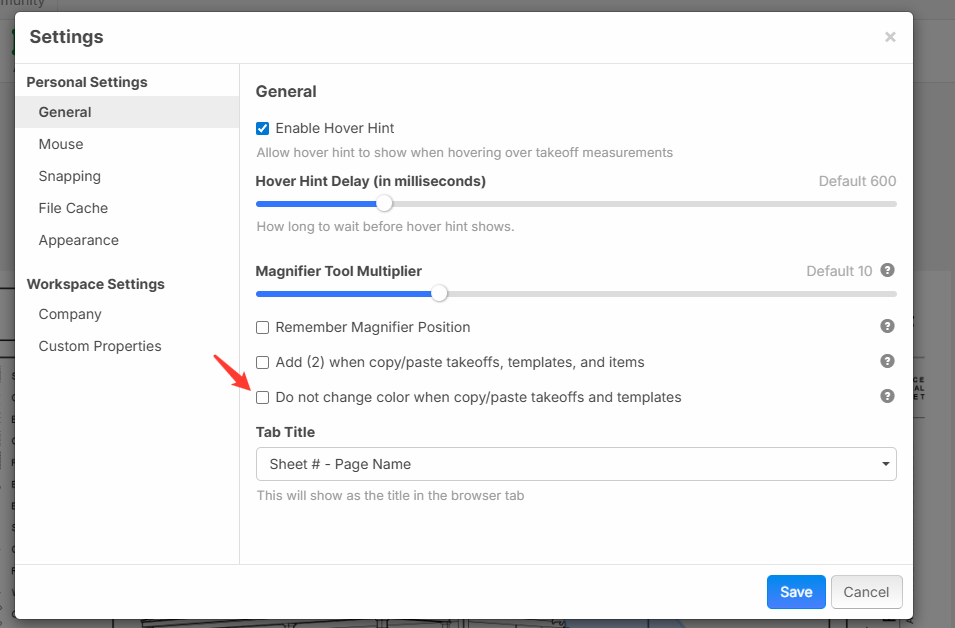
🤞2👍3When copying a folder in the takeoff tab to a new folder it automatically changes the colors of the counts. Would be nice if it kept the same colors or have the option to do so.
🤞1👍1When importing from Planswift it doesn't retain the count shapes. It would be helpful if it did.
🤞1👍1
Hi, it looks like I can't delete empty takeoff folders (if I extract a schedule and want to move those items to a different folder). I get the "are you sure popup", click yes, and then nothing happens.
👍1Thanks for all the feedback here.
@Gillian, we just deployed some more updates a few minutes ago. If you refresh the page, is it working properly for you now?
@Nicole thanks for the additional feedback on colors. We will be sure to add more options here.
@Casey We have an option in settings to keep colors when pasting takeoffs. In the future we will also make a "Paste Special" via Ctrl + Shift + V which will allow more options at the time you paste.
Regarding keeping the same color when drawing annotations, there is an option to overwrite the default (not exactly what you're after, but a step toward it). We work on more options for auto using the last settings for annotations:
Hi team, is there an updated estimate for when this rolls out as an official product update? I totally understand you’re all hard at work, and I should be more patient, but also very excited to get cracking so I thought I’d ask.
🤞3👍2%22%2F%3E%3Ctext%20x%3D%2232%22%20y%3D%2233%22%20text-anchor%3D%22middle%22%20dominant-baseline%3D%22central%22%20font-family%3D%22Arial%2C%20sans-serif%22%20font-size%3D%2226%22%20font-weight%3D%22600%22%20fill%3D%22%23fff%22%3EKP%3C%2Ftext%3E%3C%2Fsvg%3E "Kory Podgaysky")

%22%2F%3E%3Ctext%20x%3D%2232%22%20y%3D%2233%22%20text-anchor%3D%22middle%22%20dominant-baseline%3D%22central%22%20font-family%3D%22Arial%2C%20sans-serif%22%20font-size%3D%2226%22%20font-weight%3D%22600%22%20fill%3D%22%23fff%22%3EJ%3C%2Ftext%3E%3C%2Fsvg%3E "Jes")
Not sure if this is a bug or intentional, but when I set a takeoff's name to Text with Tags and use [Area] or [Linear] in the name, it truncates the value to thousandths instead of hundredths. When you use those same tags in formula mode, it truncates to hundredths.
Thanks guys. We will put out a detailed post soon with videos on the new features.
@Jes do you think it's more ideal (as a default) for auto round to 2 decimals or 3 decimals when a number is used in a text property (such as name)?
🔥2I like having the choice. We are in the brick industry where brick are typically quoted something like $455/1000 which we price in our templates as $0.455. I'd like to have 3 decimals for brick but 2 for everything else.
👍2