










 Inside Track
Custom Properties on its Own Page
When we move custom properties to its own full page, does this seem like a the right spot to access it?
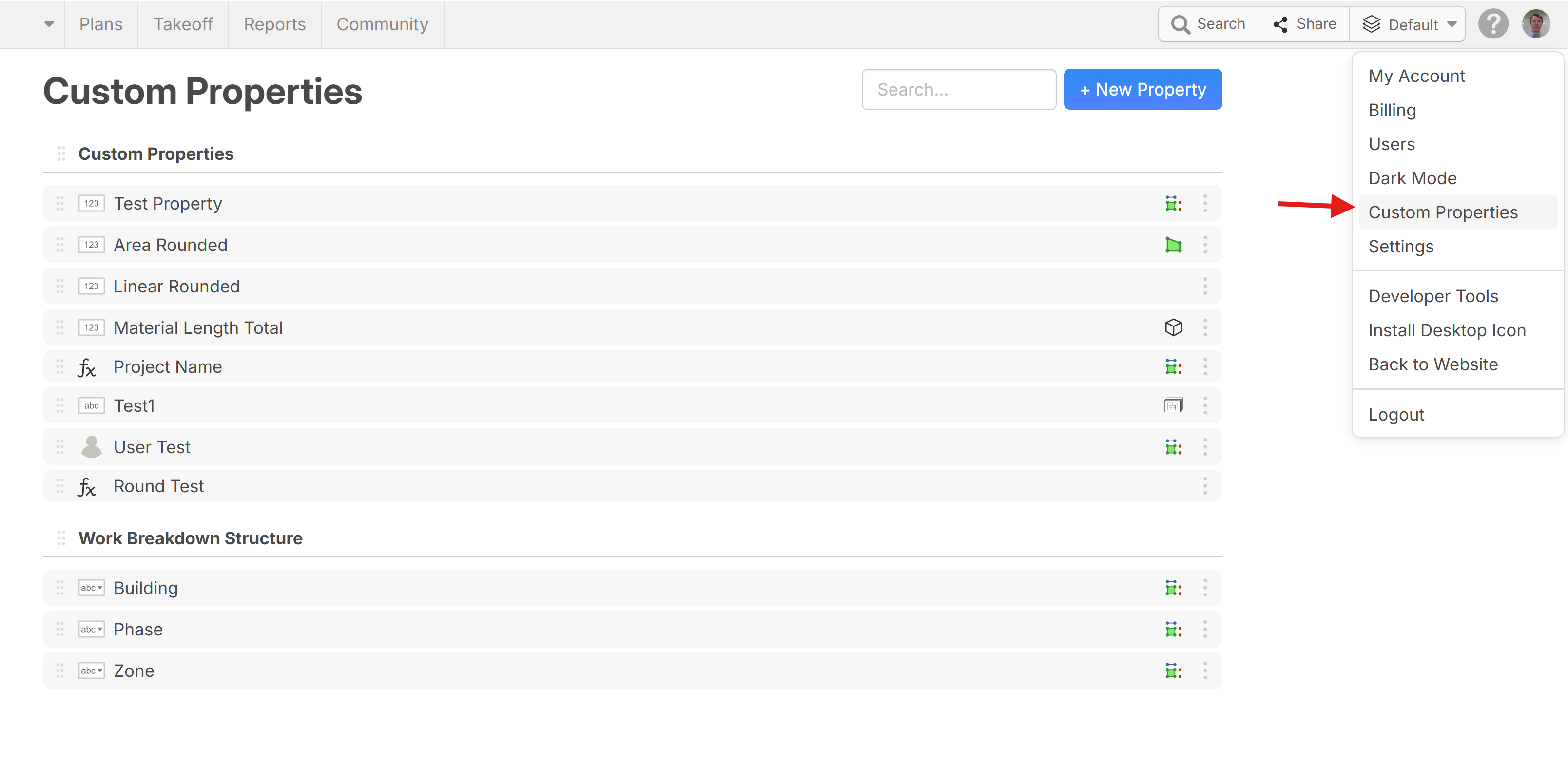

Could it be a button next to the layers button. I tend to go there a lot, but maybe it will be less and less as I continue to develop our system.
👍2%22%2F%3E%3Ctext%20x%3D%2232%22%20y%3D%2233%22%20text-anchor%3D%22middle%22%20dominant-baseline%3D%22central%22%20font-family%3D%22Arial%2C%20sans-serif%22%20font-size%3D%2226%22%20font-weight%3D%22600%22%20fill%3D%22%23fff%22%3EKP%3C%2Ftext%3E%3C%2Fsvg%3E "Kory Podgaysky")
I like it as Heber has it above.
Putting it on it's own tab or own button sounds great for the person that is setting them up but once the system has been set up, do we need it there? For our use case, we don't access custom properties from this menu once they are setup. I also like the idea of all tabs and buttons on the user's screen being things that are used every day. Adding tabs or buttons for things not used every day adds clutter to the workspace.
👍2
Please keep it hidden! The more people that know about that the more problems I have with our 200 estimators in one workspace.
Really need this:
1) Enterprise Custom Properties (Locked down, only admins can access)
2) Project Custom Properties. (Our people are starting to get dangerous, and there is starting to be use-cases where they want to make their own things)
We can't get number 2 tho until we get the one project to many takeoffs setup as identified in our #1 priority here. LINK
👍4
Good spot where you are showing it Heber, and ditto what Kory says. Less clutter!.

Love that it’s at its own spot over having to go to gatekeeper settings, however, it seems like I’m on the minority again as far as thinking a standalone tab for backend administration would be more ideal. I personally would like to see a tab or some way to organize and manage custom properties with ability to collapse, search, lock, hide, etc. my three biggest PITA’s in this regard are:
- Having to scroll through the list of custom properties every time I save a property and then need to go to another item in same group (which is most likely at the bottom of the list). This is only really relevant when I’m trying out new or different strategies though…
- For some reason (and this is probably a big me problem), and maybe it’s my screen resolution or because I don’t scroll down far enough… There’s a high likelihood that I hit the setting ‘Save’ button instead of the custom property ‘Save’ button which starts the cycle over again of going to settings and then going to custom Properties… Which it seems one of these steps may now be reduced with proposed suggestion/improvement
- Would like the ability to collapse group headings.
- As others have mentioned, it would be nice to have an admin area within settings to lock and or hide custom settings groups.
As always, it would be great to see the big picture (dedicated screen real estate) on one tab/screen to better visualize the organization and direction I’m going as I dial in what works uniquely for my needs at the time.