











ZZ Revisions
Hey Team,
How are people handling drawing revisions within the same ZZ Takeoff project?
My current workflow is:
- Complete the original takeoff.
- Duplicate the entire ZZ project when a new drawing revision arrives.
- Import the revised drawings into the duplicated project.
- Copy/paste the existing takeoffs onto the new drawings.
- Make the required changes.
I do it this way because I want to preserve the original takeoff exactly as it was, while also having a complete revised takeoff that I can compare against the previous version.
I know ZZ has revision functionality, but I haven’t used it much.
Can the revision workflow achieve the same thing inside one project?
Ideally I’d like something like:
- Project: 219 Fast Track
- Original drawings/takeoff preserved
- Rev1 drawings added/replaced
- Existing takeoffs carried across where possible
- Rev1 changes made without destroying Rev0
- Ability to switch between or compare previous and current revisions
- Previous quantities/takeoffs remain accessible for audit and variation comparison
If so, how are people setting this up?
Also, does ZZ preserve the same takeoff/object IDs when an existing takeoff is carried onto a revised drawing, or does the revision process create new objects/IDs?
I’m mainly trying to understand whether I can stop duplicating whole projects while still retaining a proper revision history and quantity delta trail.

That's how we do it, and I wouldn't recommend doing it another way if you want to maintain some sort of trail to follow.
I think this is one of the last few big development hurdles zzTakeoff could/should tackle to assert itself as the industry standard takeoff tool.
👍1
@Thomas, with the built-in revisioning, you can choose to either copy the takeoff sections or move them to the new page. If you copy, we create new sections/ids. We will be improving the flow soon to make it easier to manage and compare changes between revisions.

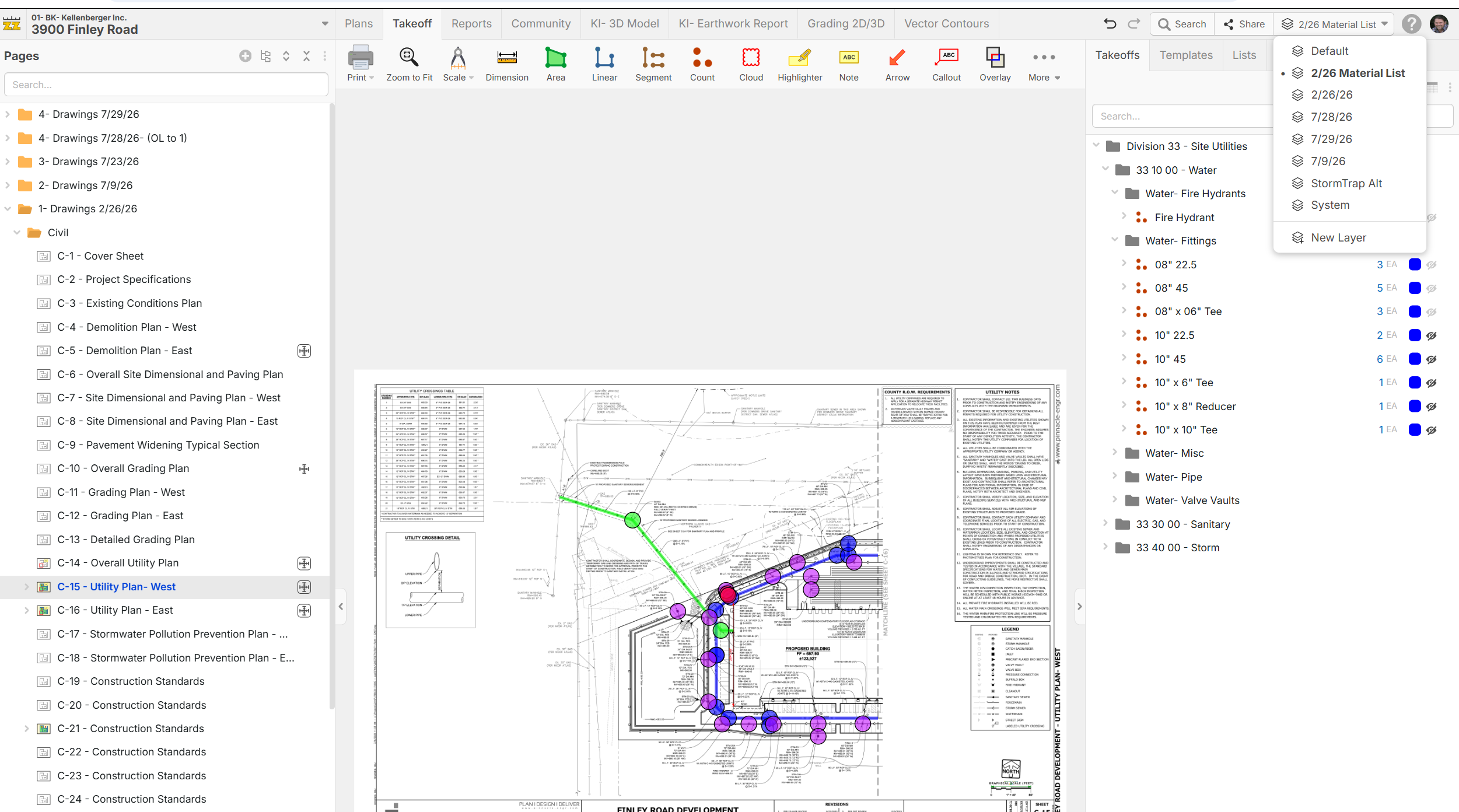
@Thomas, have you considered using layers?
I have all my templates set up for Division, Sub-Section, Group, & Sub-Group and I put all that plan set takeoffs in a layer with that plan date, then on the reports I can just filter by layer.

Thanks for the responses.
Victor I agree, we need to maintain an audit trail, so duplicating the project is the way I have always done it
Lorin, I have tried the revision two or three times and I never got it to work properly, it's too determined on the drawing numbers and therefore subject to the designers document control. Also copying duplicates my quantities and pricing instead of silo Rev0 from Rev1. So I have to delete the original which it the precise problem I want to avoid.
Bryan, I haven't tried this but will test it next week
Thanks all

Did something change? Last time I copied, it didnt duplicate totals. Takeoffs on outdated sheets no longer added into totals.
@Kory, that is still the case. Takeoff data on outdated sheets does not show in reports as long as they are "Old Version For Page". @Thomas, if you duplicate the page without making it an old version for the page, that could be why the qty's were duplicated.
@Thomas, for lining up the old pages to the new pages, we're open to feedback on improving the flow. Is there anything else that is consistent across the drawings that could help us line up the plans?

Need a way to expand the original page name when you are selecting what the new page is replacing. Some of the names get pretty long and you can only see like 2" worth of the page names. I'd like to be able to expand the width of that drop down or at least have the ability to scroll horizontally.
👍1