










 Q & A
Q & AWhen taking off a wood framed wall in Planswift it is possible to get stud quantities based on stud spacing, # of doors, # of windows, junctions, and
Wood Framed wall takeoffs

Yeah I would bet you can, especially once they drop the next update when you can have more advanced parent-child relationships. Here is a 5min viedo of me trying to do it, i'm sure there are better people to learn from than me tho! LINK
👍1
@Lawrence Yes, you can get some of this with variable currently at the "Item" level. If you need # of Windows, # of Doors to be Count takeoffs, as Kyle mentions in the upcoming release you could have a Count that is a child of the Linear for deductions.
@Kyle Thanks a bunch for the video 🙂 We can't wait to get this next release out. It will help a lot.
%22%2F%3E%3Ctext%20x%3D%2232%22%20y%3D%2233%22%20text-anchor%3D%22middle%22%20dominant-baseline%3D%22central%22%20font-family%3D%22Arial%2C%20sans-serif%22%20font-size%3D%2226%22%20font-weight%3D%22600%22%20fill%3D%22%23fff%22%3EEP%3C%2Ftext%3E%3C%2Fsvg%3E "Eric Pendland")
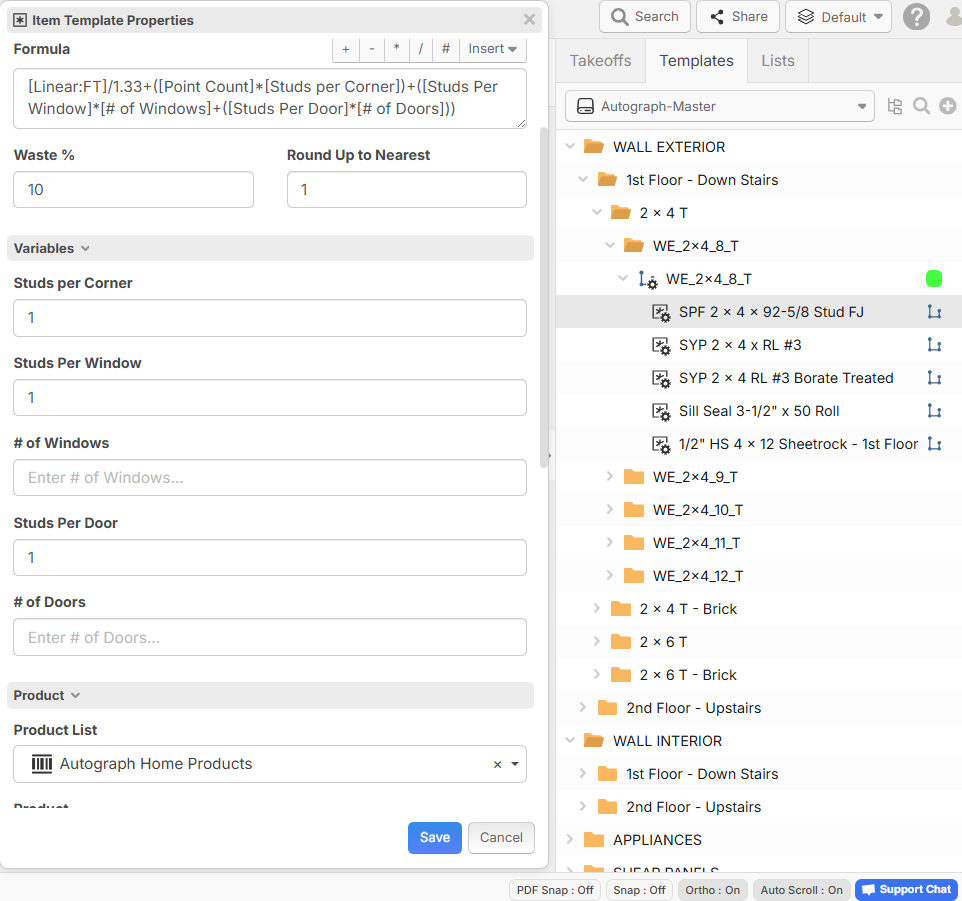
This is what I do. I created variables in my formula where I can add studs per Window or Door Opening* Number of Window and Door Openings in wall. I can also change the Studs Per Corner per Point Click. So I take all the 8' walls off and then count my openings and plug them into my Stud Variables and it adds it to the LF/1.33 for 16" on center spacing for the Wall Studs. This will give me my Stud Count for the Wall + Openings Stud Count + Studs per Corner. I also have my Cost Code and Item number added per material so I can quickly export a report where I can copy and paste into my ERP Import. It will good when Heber and team have the API's available where we can map the Report Columns to the ERP Import and save even more time.
%22%2F%3E%3Ctext%20x%3D%2232%22%20y%3D%2233%22%20text-anchor%3D%22middle%22%20dominant-baseline%3D%22central%22%20font-family%3D%22Arial%2C%20sans-serif%22%20font-size%3D%2226%22%20font-weight%3D%22600%22%20fill%3D%22%23fff%22%3ELB%3C%2Ftext%3E%3C%2Fsvg%3E "Lawrence Broderick")
Kyle, thanks for the video. It's great starting point. With some work on my part it could get me closer to what I am trying to achieve.
Heber, look forward to the new release. I would guess you would be able to use the Child for additions as well.
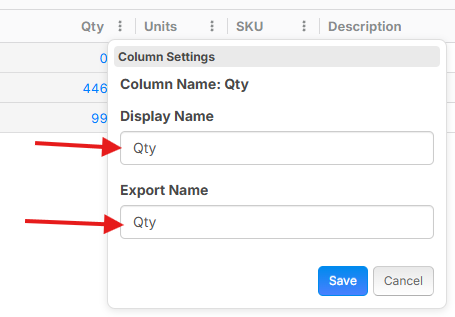
👍1@Eric The upcoming release (which is on our TEST server) does have the ability to rename the columns for export to CSV.
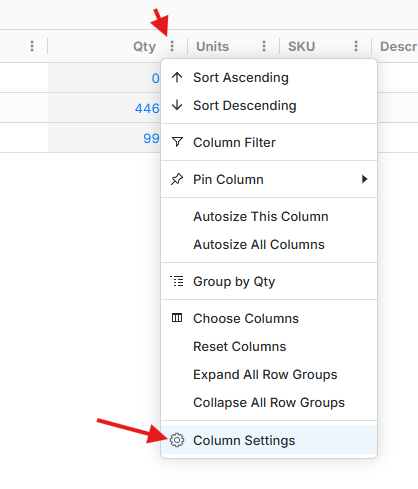
Then you can customize how the columns display in the report view and how they export to Excel or CSV:
We will also be pushing for direct API integrations as we move forward 🙂
@Lawrence Yes, you can use counts for additions as well, or as additional variables in your formulas. Assemblies are much more powerful in the new release.
👍2🚀1
Very interesting feature, would be useful for us too in decking with planks width