










 Q & A
Q & A%22%2F%3E%3Ctext%20x%3D%2232%22%20y%3D%2233%22%20text-anchor%3D%22middle%22%20dominant-baseline%3D%22central%22%20font-family%3D%22Arial%2C%20sans-serif%22%20font-size%3D%2226%22%20font-weight%3D%22600%22%20fill%3D%22%23fff%22%3EAU%3C%2Ftext%3E%3C%2Fsvg%3E "Anthony Ugarkovic")
Shortcuts
Hi Everyone,
new to the program, Just a question if i am doing a count item and i complete it, but then want to continue the takeoff at a different section, is there a shortcut to start to use the same count again? instead of right clicking and clicking start with the mouse?

Hi, every point count create a brand new section, they never share a quantity like linear and area share qty within a section.

You can also click on one of the counts that you have already started and hit N on your keyboard and that will resume your count.
🔥1👍1Thats right Todd, we do have a keyboard shortcut for this, thanks! I want Anthony to understand that clicking 5 points when starting a count takeoff, creates 5 sections. Stopping it and starting it and clicking one more point creates a 6th section. This creates an identical outcome as if you never stopped the takeoff at all, and works just like clicking 6 points from the start without stopping on a brand new count takeoff.

"N" is the only keyboard shortcut I use. you are missing out on Life if your not using "N". zzTO needs to update their keyboard shortcut menu to put little fire graphics on the ones that are the most used and you can't miss out on.
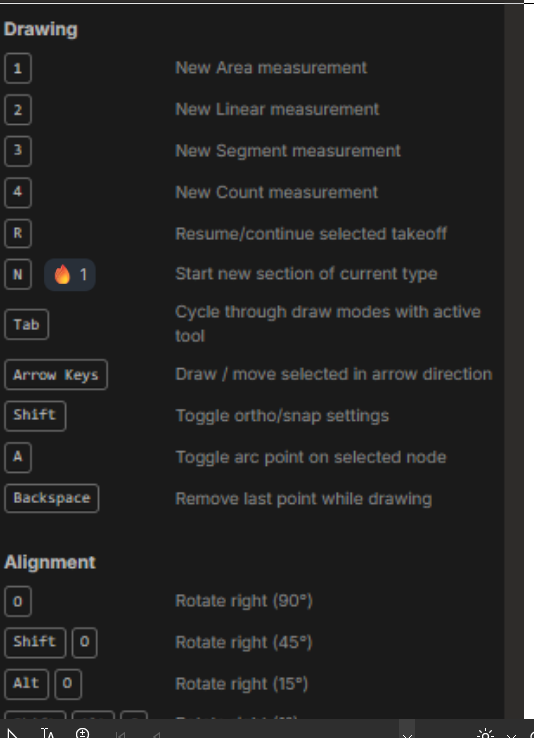
And if we would ever get a "D" key for dimension that would also deserve a fire image!
👍2🔥1