










 Q & A
Q & A%22%2F%3E%3Ctext%20x%3D%2232%22%20y%3D%2233%22%20text-anchor%3D%22middle%22%20dominant-baseline%3D%22central%22%20font-family%3D%22Arial%2C%20sans-serif%22%20font-size%3D%2226%22%20font-weight%3D%22600%22%20fill%3D%22%23fff%22%3EJW%3C%2Ftext%3E%3C%2Fsvg%3E "Joshua Wesley")
Sharing takeoffs between accounts
I have a few takeoffs within my trial account; I purchased the annual plan, but the trial plan is separate from the new annual plan. How can i move these drawings over to be accessible to the annual plan account once my trial is over?

Hi there Joshua , great questions. If you chat in the crisp help channel and ask to have your data transferred the team here can help you. I would wait until 8am Mtn time
Thanks
Joshua, I recently had something similar going on, and I was able to transfer Jobs that I had been working on between workspaces from my own 'Workspace' to the new official company Workspace that started after I had begun the takeoffs on a set of plans
First you'll need to invite your first Account to be a part of the New Workspace that the New Account with your annual plan has, so your trial account will have temporary access to the new Workspace, you'll be listed in the Share section under this place

Go back to your Trial Account's Workspace
then go to the upper left and hit the down arrow to get the Open Projects,
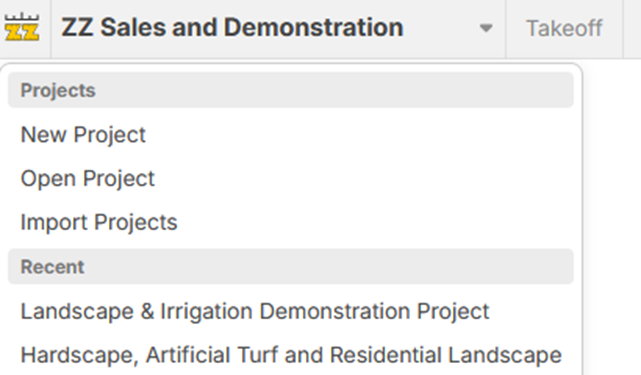
When the Menu for open Projects comes up,
Choose the job file you want to move to the new account's workspace and over to the right of that menu will be the three dots, click the three dots,
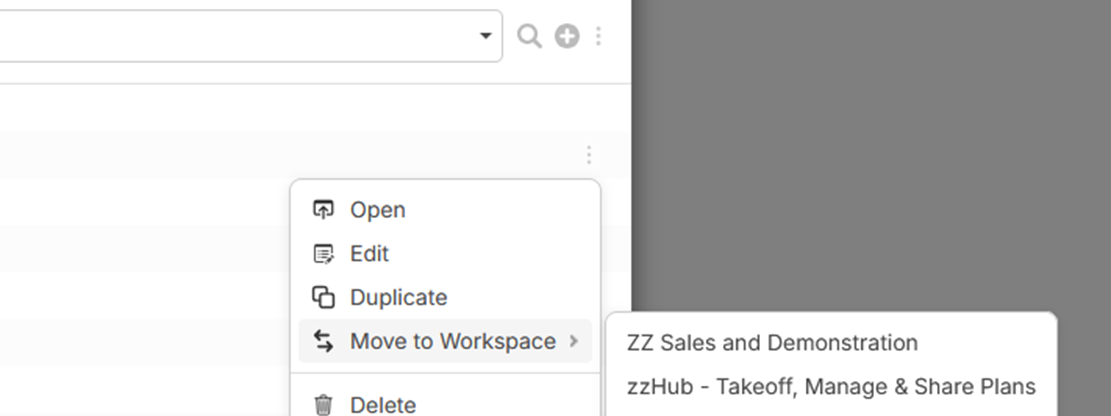
Because you are part of both Workspaces, you will have an option to Move to Workspace, this will move that job file, and all the work you have put into it, and you will not have it in your first workspace anymore
but if you want to, you can also duplicate the job first, and then both workspaces will have a copy of the file (as it was at the time of duplicating, any changes made after will be changed individually of each other) I made a duplicate of mine for peace of mind, but I had no issues with the transfer