










 Q & A
Q & AProperties Pane
I'm new to zz. I searched around trying to find an answer for this question. My question is, is there a way to dock the properties pane? In the main view area when you right click and select properties, that pane comes up where you right clicked. Then if you right click again, the original pane goes away. Now if you right click on one of your takeoff items in the right side menu, select properties you can make that pane go wherever you want. But it disappears when you right click to select the properties on another item. But, that pane will open where you last moved it. Am I missing something or is there a way to "dock" the properties pane?
Tysen

Hi Tysen,
Try undocking the side bar template and send it to another monitor.
See if that solves the issue.
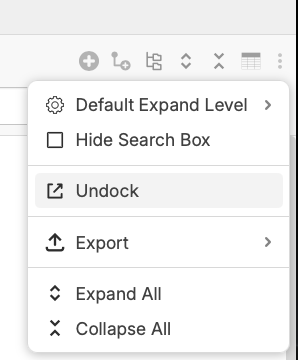

I tried that and it becomes like a static object. When I click an item on screen the properties pane will highlight what I selected. But when it's undocked and by itself, it doesn't highlight or dynamically update like it does when it's docked normally. I'd love to have a properties pane that updates as you click different takeoff items, if that makes sense. My one example is like how TBC does it's properties pane. I also think I understand why the properties pane opens where you right click, but I'd like the properties pane to be in a fixed location. This is definitely a "wish" type item. Not a "fix" or "issue" that needs to get solved. So far I'm loving this program and finding more and more things I can do with formulas.
Tysen
👍1
Thank you for the feedback, Tysen! I'll mention this to the team. 🙂