










 Q & A
Q & AIs there a way to utlize both metric and imperial scale within the same project?
I am Canadian and we tend to need to be able to utilize both. just noticing i cannot use ft or inches in the template if i create the project in Metric.

Had this question come up today. I tried switching one of my test jobs and it gave me a error. I feel like you have to set this at the start and can't switch back and forth correct?

@Kyle This is mostly solved now. If you go hybrid and start mixing units inside takeoff, you just need to be mindful of how the items and templates were originally built and how you’re using the custom UOM settings.
In practice, I usually work in imperial and keep my templates imperial as well. ZZ will scale metric drawings correctly and still let me work in imperial if I set the project to imperial at the project level. Because of that, I haven’t had much need to flip back and forth or dig too deeply into the other settings yet.
Hope that helps.
👍1
Hi, my recommendation would be to duplicate the page, and use one imperial in the name of the page and one metric in the name of the page. This allows each page to have a scale and do takeoffs in those units.
Stephen, I’m not sure if it is that simple.
I believe the choice you make at the project level is what determines the default measurements for the takeoffs you start.
you could do this, but I think whichever was the drawing that didn’t match the project level UOM setting you would be tweaking the output of each new takeoff or using templates built to match the UOM you wanted. This would get messy in the takeoff window
I could be missing something but here’s one example how I see it.
If using metric drawings they get auto scaled using metric scale but you can convert to imperial for you at the project level. Each drawing in your project package still show the metric scale is being used to ensure the correct scale.
if I wanted to do what you are suggesting I think I would have to scale the page using a known dimension because auto scale will revert to the project level setting
Of course I could be missing something.
You are correct about the default units, you would have to change that when making new takeoffs on the other page. The thing I would be worried about it my estimators swapping units on accident and resulting in bad outputs unknowningly. One nice thing to prevent this is our formulas with units. These allow you to require a specific unit type like [Area:SF] and [Area:m2] both of these return the correct value in the correct units. As long as you make sure you have these units in the formulas, you are protected from unit conversion errors.

You can always in a Metric Plan for examplse (same applies in imperial) Do an Area Takeoff in m2 and select the Units to display in SF
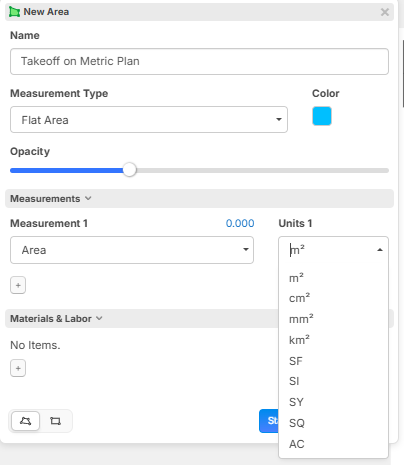
Yes I’m glad we have both options to change this inside a project as welI. I just think when possible it’s safest / cleaner to choose the UOM you want to use in takeoffs at the project level.
there are times where I’d likely want to scale in metric and convert to imperial within the takeoff so the call out dimensions on the drawing match, but most of the time for me personally it won’t be necessary
👍1