










How are you adding plan revisions?
I have bid set drawings, multiple addendums and then ASIs and PRs and COs. It is a mess on the folder system. I need to hear some ideas on how to keep all of this organized.

Before you upload a new set you can select the "Revision Plan Set" option. You can select rather if you want to "Copy", "Move", or "Do Nothing" with all the annotations and takeoffs you might have into the new set pages.
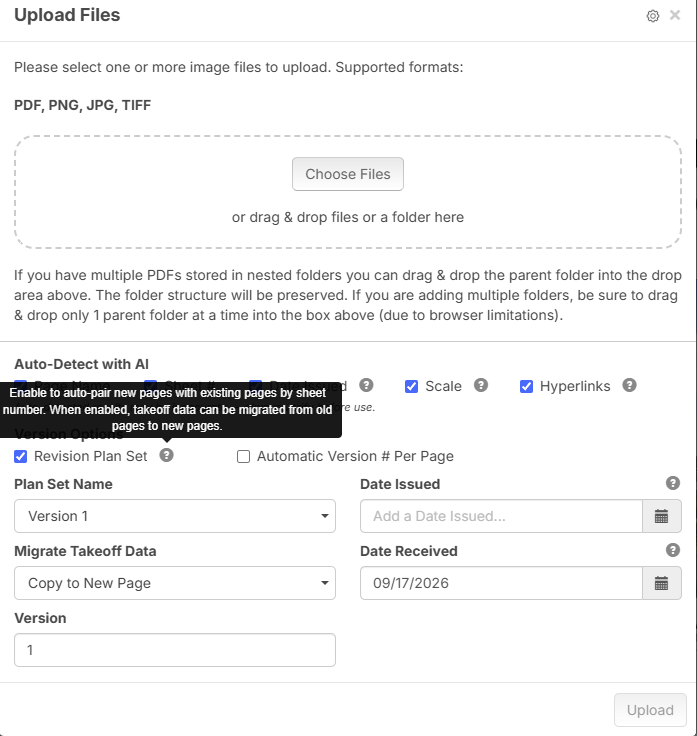
After you upload them the change is that in the page preview window you will find two new features: Overlay with the latest version of each page and each page will be automatically linked to the previous set page (this depends on the sheet number, so make sure you double check AI made everything fine, if not you can also link pages manually).
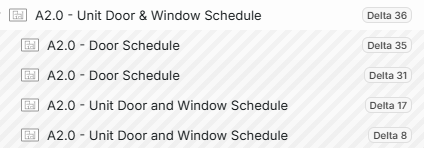
In the pages menu on takeoff now you will see that all pages that were updated will appear with the set name you established. If you link on top of the name you will be able to see the set history, and view this pages, which now will appear with an "Outdated" watermark.
%22%2F%3E%3Ctext%20x%3D%2232%22%20y%3D%2233%22%20text-anchor%3D%22middle%22%20dominant-baseline%3D%22central%22%20font-family%3D%22Arial%2C%20sans-serif%22%20font-size%3D%2226%22%20font-weight%3D%22600%22%20fill%3D%22%23fff%22%3EJR%3C%2Ftext%3E%3C%2Fsvg%3E "John Reily")
Ok, I have used all of what you mentioned above. At some point it starts not recognizing the drawings are supposed to be grouped together. Then I have to manually move the drawing to the correct location and set them as the current page etc. Thank you for your help!