










 Q & A
Q & A144d 8h
Extracting a page and exporting
I need to export a page to send to a client. How do I do that?

Sam Romeo zzTakeoff144d 8h
If you Navigate to the required page and click on the print icon, select the option you require, in your example "Print Current Page" then select Save as PDF as your Printer
👍1🚀2
District Concrete 143d 18h
It printed, but did not give me the option to save as a PDF

Todd Kaberline zzTakeoff143d 18h
Hi Brian, if you can chat in thru our support chat and one of our team members would love to help you out there
Maybe in a zoom mtg
Todd Kaberline zzTakeoff143d 18h
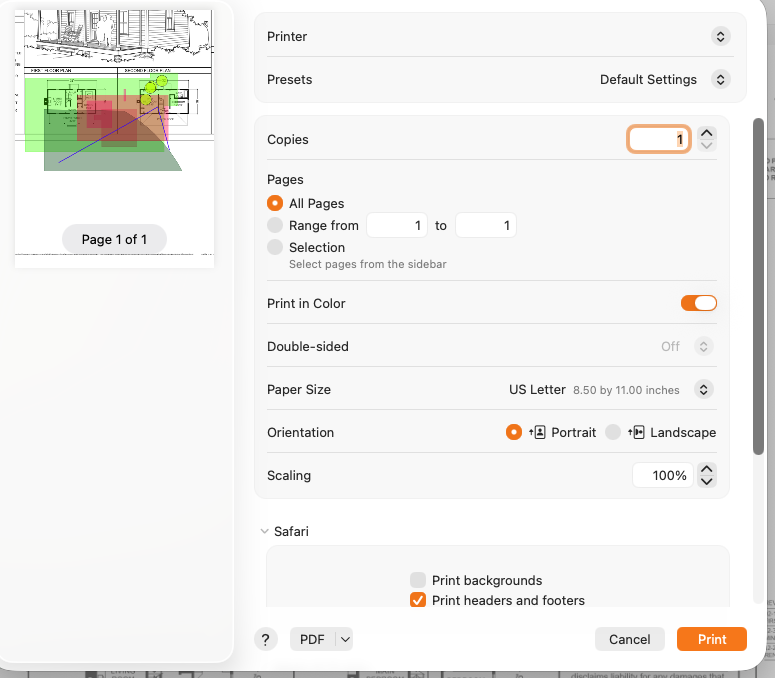
At the bottom of the print page pop out is PDF. See if that works for what you are asking
District Concrete 143d 18h
Where do I find support chat lol?

Stephen Daves zzTakeoff143d 18h
Hi @Brian , you can click the Takeoff tab above where you do takeoffs, and click the blue Support Chat button in the bottom right.
You must be logged in to post replies. If you don't have an account you can signup here.