










 Q & A
Q & ADont understand the usecase of New Child
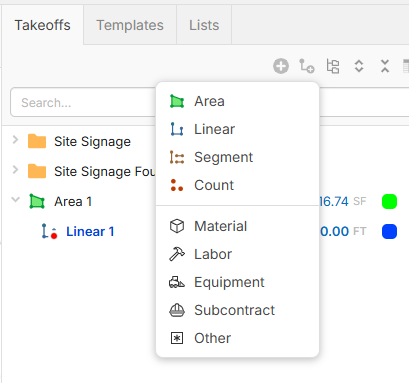
Whats the use of Child? If I add a Linear takeoff as a Child to Area takeoff, my hope is that would add perimeter takeoff for that area. But here it stays 0.00 FT.

Hi Anand,
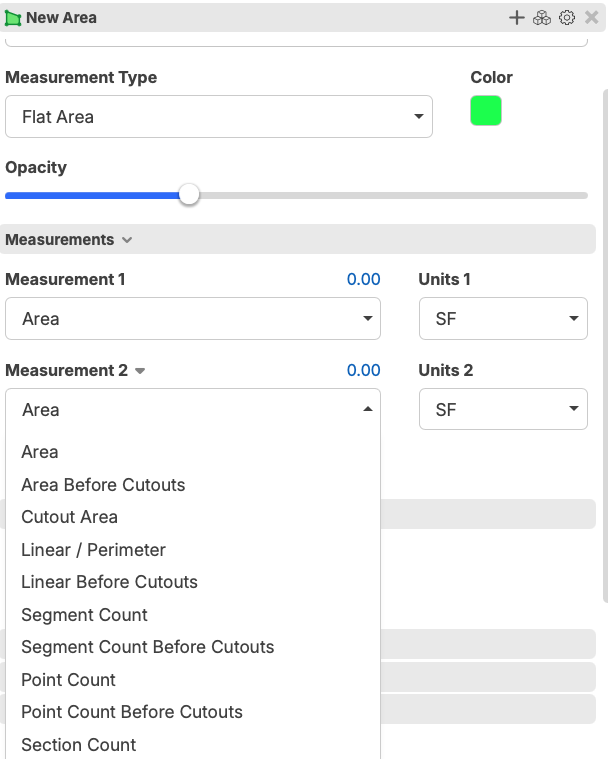
Calculating the perimeter of an area is already done when you measure that area, if you go to the takeoff property and chose Measurement 2 as a linear Perimeter

This took a bit for me to understand as well. If you select one of the takeoff types (area, linear, etc) you must still actually take them off (which is why it is 0). However, by selecting material, labor, other, etc., you can pull the parent quantities that todd mentioned.
💯3
I'm trying to set up a parent/child takeoff to share a single traced length across two items.
Example: I want to get CY for a retaining wall and its foundation. Both are linear takeoffs with identical length, so I created the foundation as a child of the wall takeoff. The goal is to enter separate Width and Depth/Height dimensions for each, while tracing the length only once — with the foundation quantity updating automatically as I add to the takeoff.
This worked in PlanSwift, but here I'm having to trace the length twice even though the foundation is set up as a child.
Is there a setting I'm missing to have a child takeoff inherit the parent's traced length? Any guidance appreciated.
Okay, I understand that is time consuming. It is hard to do what you are asking, but we have ways.. can you chat in to ask for a zoom meet with me
and I can show two ways that may help, or I can make a short video and put it here in the community
👍1Here is a video that will show you two different ways to handle what you are asking for,
👍1The second way solves my issue. I did not know the "../" feature. Is there a document that has list of all those formulas explained?
There is a searchable library of training videos here in the community. If you search for formulas that will shorten the list down.