










 Q & A
Q & ADelete multiple templates
Is there a way to delete multiple templates at one time? I imported a batch of PS templates to discover a PS function in my formulas won't work. Now I need to delete them all.

There are a few ways to do this.
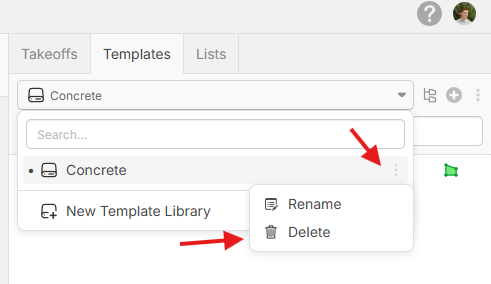
1. If you imported PS templates and it created a new template library, you can delete the entire template library.
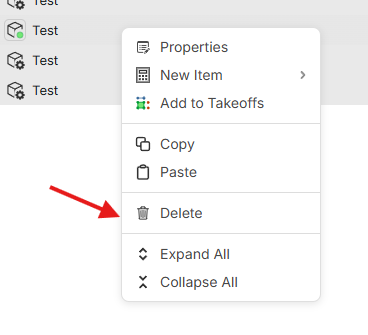
2. You can also select multiple templates using SHIFT + Click, then right-click to delete.
%22%2F%3E%3Ctext%20x%3D%2232%22%20y%3D%2233%22%20text-anchor%3D%22middle%22%20dominant-baseline%3D%22central%22%20font-family%3D%22Arial%2C%20sans-serif%22%20font-size%3D%2226%22%20font-weight%3D%22600%22%20fill%3D%22%23fff%22%3EDJ%3C%2Ftext%3E%3C%2Fsvg%3E "Doug Jones")
Sorry, I wasn't clear in my question. They were imported as multiple template libraries. It is those libraries I would like to multiple select and delete, but have not found a way yet.

Hi when you click the dropdown to select a template library and hover over the one you want to delete there is a ... that shows up on the right. Click this then Delete if you want to delete the library.