










 Q & A
Q & A206d 13h
Bi-Directional Selection
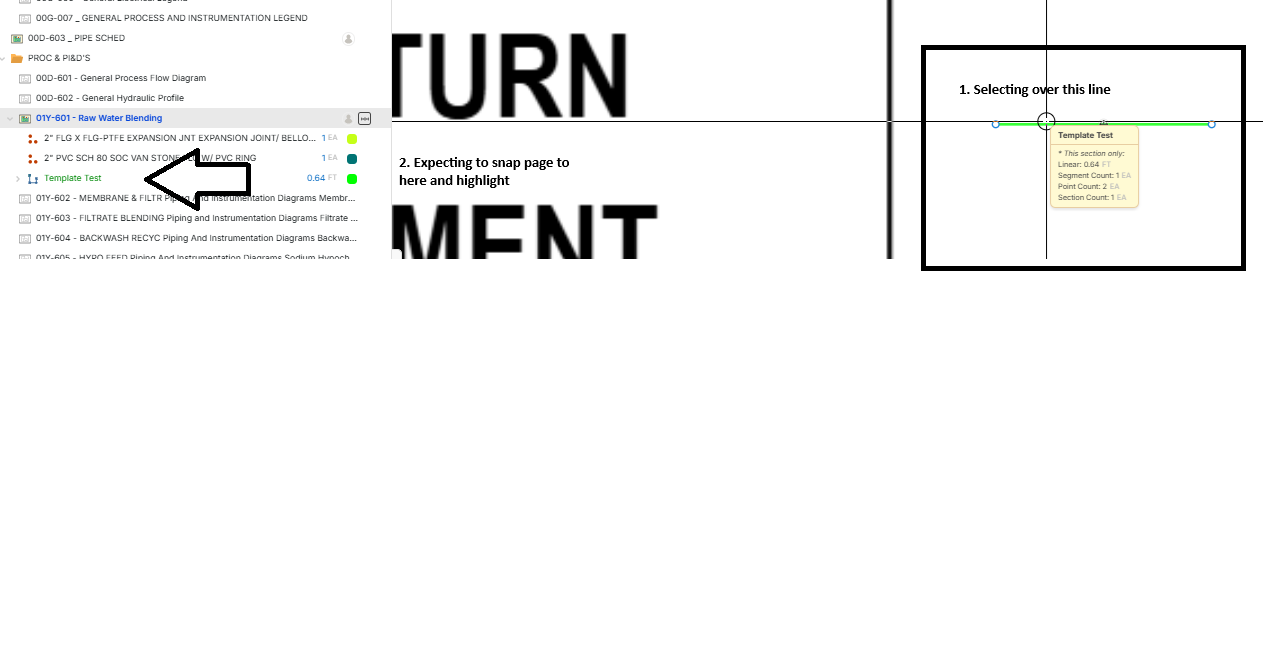
Hey all! Is there a way to make it so that when i click on an item in my takeoff, it snaps to it in the page/item screen? It works the other way around, but would be nice to have it both ways

Stephen Daves zzTakeoff206d 12h
Hi, I'm trying to understand what you mean. Do you mean when you click on an item on the takeoff page? Also, where exactly did you want it to take you?
%22%2F%3E%3Ctext%20x%3D%2232%22%20y%3D%2233%22%20text-anchor%3D%22middle%22%20dominant-baseline%3D%22central%22%20font-family%3D%22Arial%2C%20sans-serif%22%20font-size%3D%2226%22%20font-weight%3D%22600%22%20fill%3D%22%23fff%22%3EA%3C%2Ftext%3E%3C%2Fsvg%3E "AnonymousOne")
AnonymousOne 206d 11h
Stephen Daves zzTakeoff206d 10h
You can click the > button to the left of the "Template Test" green item next to your arrow, then click the section that expands under this row, and it will navigate to the item on the page and zoom in to see the item.
You must be logged in to post replies. If you don't have an account you can signup here.