










 Q & A
Q & A
Alphabetical order files
Hey team,
Does ZZ have the A>Z function like PS? so our files are in correct order?
or i have to drag and drop them?
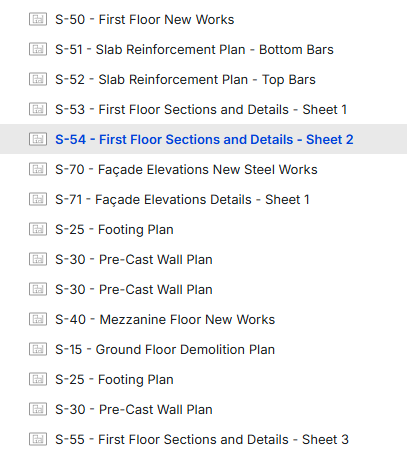

When you imported them, were they in order? Do you have them grouped by anything?

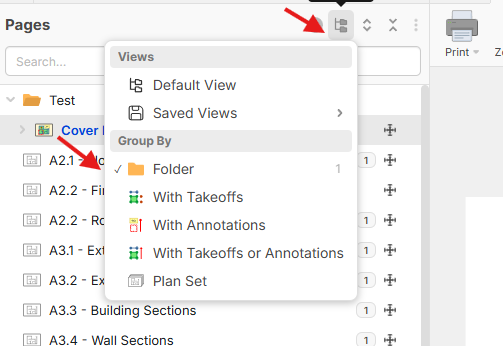
Hey Thomas, we currently don't have an A > Z re-order function, but if you group by "Folder", then we sort the pages alphabetically. Note: if you are grouping by anything, you can't re-order the pages.
%22%2F%3E%3Ctext%20x%3D%2232%22%20y%3D%2233%22%20text-anchor%3D%22middle%22%20dominant-baseline%3D%22central%22%20font-family%3D%22Arial%2C%20sans-serif%22%20font-size%3D%2226%22%20font-weight%3D%22600%22%20fill%3D%22%23fff%22%3ESD%3C%2Ftext%3E%3C%2Fsvg%3E "Samuel Duga")
I second this feature as being highly desirable to have, especially as some documents come in as multiple disciplines with the same page numbers printed on them.
For example, we receive many Finishses Schedules which are split between units, common areas, interior, exterior, FFE etc.
All these are actually different documents, but are batched together into one document by the architect/builder.
When ZZTakeoff imports the entire PDF file, it jumbles up and groups all the pages labelled as page number '2' together, however that page number belongs to their respective discipline and should not be grouped together.
I would like some sorting options for one (alphabetical, page numbers etc), or alternatively, an option during import to keep the pages as per the original document.
And yes, unselecteing the "Group By folder" does set them in their original order, but the naming then needs to be re-compiled so that they make sense, especially on large multi-page documents.
👍2