










 Q & A
Q & A%22%2F%3E%3Ctext%20x%3D%2232%22%20y%3D%2233%22%20text-anchor%3D%22middle%22%20dominant-baseline%3D%22central%22%20font-family%3D%22Arial%2C%20sans-serif%22%20font-size%3D%2226%22%20font-weight%3D%22600%22%20fill%3D%22%23fff%22%3ECT%3C%2Ftext%3E%3C%2Fsvg%3E "Chuck Trimble")
Addendums
How do you handle replacement drawings that are in addendums

Hey Chuck! We have a video about plan revisions that should help with this: https://www.youtube.com/watch?v=GiwSUXYCW9A
We've made some updates since this video, so you will need to check "Revision Plan Set" to get the same plan revisioning.
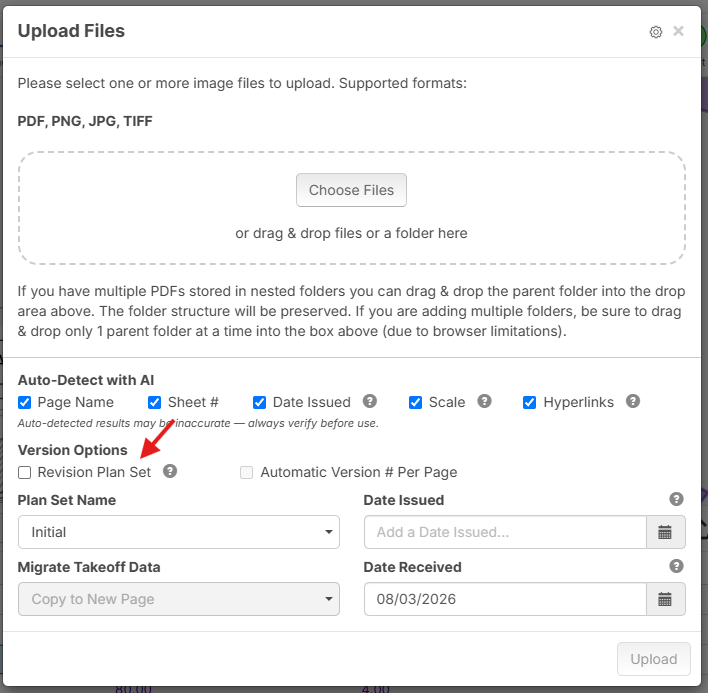
Let us know if you have any additional questions, and feel free to also reach out via our website support chat if you need help walking through the process.
👍1
Regarding workflow. I’ve been using revision plan set Option .
you can choose to copy an instance of your takeoff data to the new page(s). I highly recommend it.
I find it much easier to tweak and or delete and redo the differences on my takeoff than stare at two drawings overlaying.
the one thing I don’t really have sorted is a workflow to preserve the previous state.. The old takeoff is there, and you can revert back to it very easily but the idea gets pretty messy the more things progress.
I’ve tried using layers but it gets really confusing and messy in reporting especially if you forget, which I seem to do a lot.
I’m considering the idea of copying the whole project with takeoffs every time theres a new quote to do on the same job, maybe add the associated estimate number to the title of the old version. Then adding updated drawings to the new copy.