










 Feature Requests
Suggestion for Measuring Tool Navigation
Hi Team,
Would it be possible to introduce an option where, with a single click on a used measuring tool item inside the Takeoffs, it automatically opens the page where the takeoff was originally done?
I believe this would be a very helpful feature in zzTakeoff, especially when reviewing large projects or trying to quickly locate measurements and verify quantities without manually searching through pages.
Thanks again for all the hard work and continuous improvements to zzTakeoff. 🤟

Hi Steve,
As a Takeoff can be done on several Pages, you right click on the takeoff in the Takeoff Tab, Go to Pages in the Context Menu and select the Page you want to review
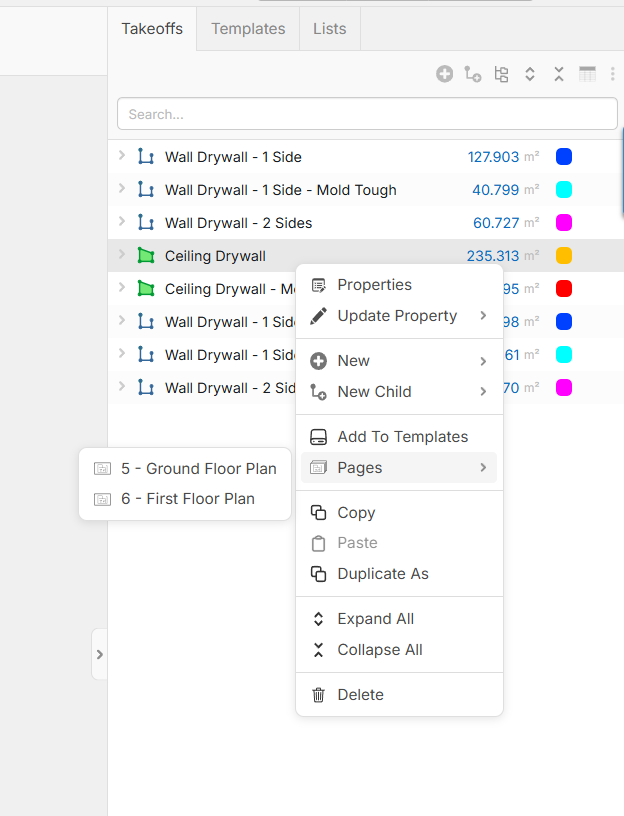

What I mean is exactly what I meant I meant before:
It would be good if clicking the takeoff line automatically opened the plan sheet where the measurement was taken from, instead of manually searching through drawing
Hi Steve,
I see what you mean now! You’re looking for a "one-click" jump to bypass the menu entirely.
The reason we have that intermediary step is that a single Takeoff (like "Ceiling Drywall") often lives on multiple plans—in my example, it’s on 2 out of 50 sheets. A direct click wouldn't know which of those two pages you wanted to see first.
However, I love the idea of a speedier workflow. Perhaps a Hotkey (like Alt + Click) that automatically opens the first page the takeoff appears on, with a way to cycle through any others? I'll pass this along to the dev team as a UX a suggestion for review.
👍1