










 Feature Requests
Standard Layers
It would be nice if there was a standard set of layers that came in with every new project.

It would be nice to set a list of ones you commonly use in the "Custom Properties".

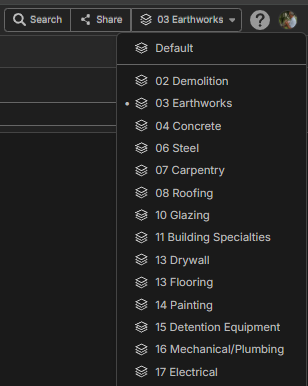
We are a big GC, and one of our regions is using this structure that goes with every bid tab as perhaps a example use case here. While we are at it, can we make the layers with takeoff have a symbol? As some of these are blank.
%22%2F%3E%3Ctext%20x%3D%2232%22%20y%3D%2233%22%20text-anchor%3D%22middle%22%20dominant-baseline%3D%22central%22%20font-family%3D%22Arial%2C%20sans-serif%22%20font-size%3D%2226%22%20font-weight%3D%22600%22%20fill%3D%22%23fff%22%3EG%3C%2Ftext%3E%3C%2Fsvg%3E "Geoff_zz")
Can you assign layers to template assemblies. In Bluebeam, when is select a "tool" it has already got a layer assigned to it.
@Geoff
yes and no. First point is layers are not what you’re thinking I bet. Think of layers as separate workspaces for people that are all working on the SAME set of plans. Best practice is I tell people to put their name and scope for each layer…. Think of bluebeam you can’t have multiple users so you don’t have this problem.
So no you can’t assign layers by default that I know of unless you duplicate a project.
now the yes is any WBS properties you can assign when you grab your takeoff from your template along with a ton of other things you can set your team up to fly mhahah.
Thanks Kyle. You bet right. 😊
So can you hide/filter your markups/takeoffs based on WBS
Geoff,
Yeah to your hearts desire....the hiding is a bit clunky right now, but you can breakout/group/sort the world in the reports by any WBS for markups/takeoff.
🚀1