Feature Requests
%22%2F%3E%3Ctext%20x%3D%2232%22%20y%3D%2233%22%20text-anchor%3D%22middle%22%20dominant-baseline%3D%22central%22%20font-family%3D%22Arial%2C%20sans-serif%22%20font-size%3D%2226%22%20font-weight%3D%22600%22%20fill%3D%22%23fff%22%3EPJ%3C%2Ftext%3E%3C%2Fsvg%3E "Perry Jenkins")
Reports: item edits & source column
Requests
1. Add a method/button in the reports tab to be able to open a take off item to edit the item in reports.
2. Add a method/button in the reports tab to be able to get back to the page(s) were the item was created.
3. Create a column in the reports that displays the source, the page(s), where you created your take off data for an item. Planswift never had this to my knowledge. Previously, I would routinely wish for to be able to create this Column, but I never could figure it out.

Hey Perry! Thank you for the feature requests. A lot of these should be able to be done with our current reports.
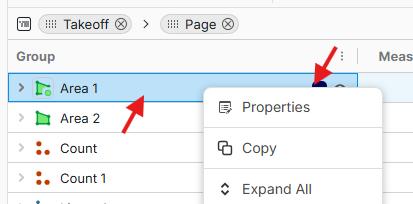
1. You can right-click on a takeoff row in the reports tab and select "Properties" to edit the takeoff properties. We don't have the right click properties for the advanced item report items, but it should be coming soon.
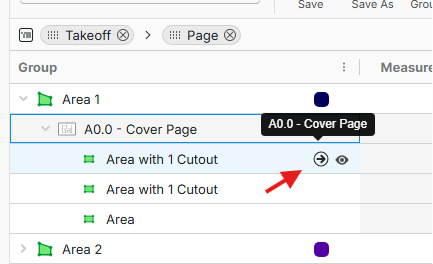
2. If you are in the Advanced Takeoff Reports, you can expand the takeoff (and page) grouping to see the takeoff sections. From there, you can go to specific sections on specific pages by selecting the go to arrow.
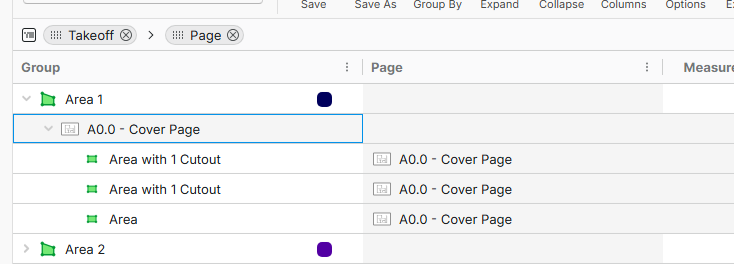
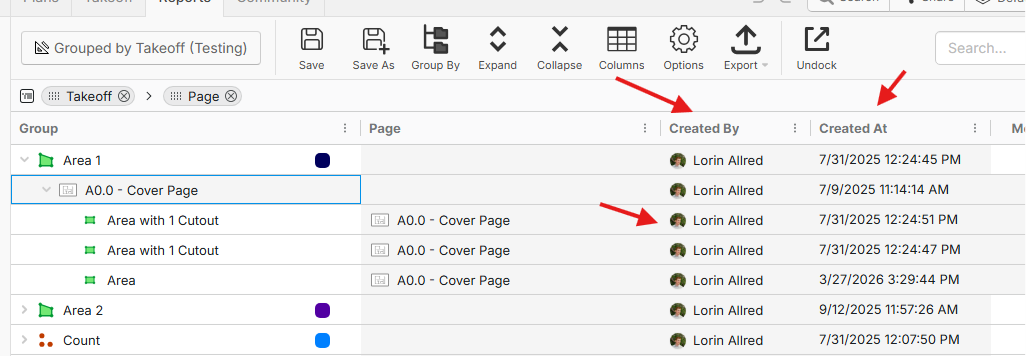
3. You should be able to enable the column "Page" and when you expand your report to the section level, you can see which page they are on. You can also enable the "Created By" or "Created At" columns (in addition to the updated) to see who created and who updated the takeoff or the sections of that takeoff.