










 Feature Requests
Layer Filter Dropdown - At the Top or Reports
Its horrible managing multiple layers with many people trying to run reports. Every time you go back in it forgets you did a layer filter. Since Layers are somewhat critical it feels like a master filter at the top would be helpful that is sticky. Thoughts?
Even if we got the normal filter to be "sticky" to remember your settings, I still would want this.


Hi Kyle,
As you already know you can set the Filter in the column header. Once done you might consider saving a Personal Copy of the Report with the Filters selected.
👍2
I feel the same way about locations. If I set a location for takeoff .I would like for it to remember it and it doesn't forget that location where someone might mistype the same location. And now we have two locations that really mean the same thing .And this done per job as each job may be a little different.

@ Sam
That workflow sucks. Works for one project yes.....but we next week we are on another project and the layer is different. Can I make a script to make a custom button for our workspace?
Our reports are so disorganized since anybody and their brother can add a "team" report.....this is still a major problem in general. Need enterprise reports, project reports, then "my" reports. I would also like to do "Region" reports, since everyone and their brother likes to make it different for their regions :)
👍2Love it that others are asking the same question....... if only the software was intuitive to figure it out on their own.....sad day.

Thanks for the feedback guys. We'll go ahead and add this. I imagine we would have a dropdown with:
1. All Layers
2. Current Layer Only - filter to whatever layer is selected in the layers dropdown at the top right
3. Choose Specific Layers
I imagine this would pre-filter the data before the grid loads it. Do you think we would want Current Layer to be the default option?
One issue is that if you choose specific layers and save a Report View for future use, those layers may not exist on the next project you open. Some users have also been asking about the ability to define layers globally at the workspace level (shared between multiple projects). Just some additional variables we would need to consider.
👍2What do you guys think of this option for the "Current Layer" as a single button at the top of reports (on/off toggle)? We've been discussing this internally and if we have a separate "Layer" dropdown on the toolbar for Reports, users may have that set to a different layer than what is at the top of the page. If users switch between the Takeoff tab and Reports tab with different layers, they may get confused since the data would mismatch. What do you think?
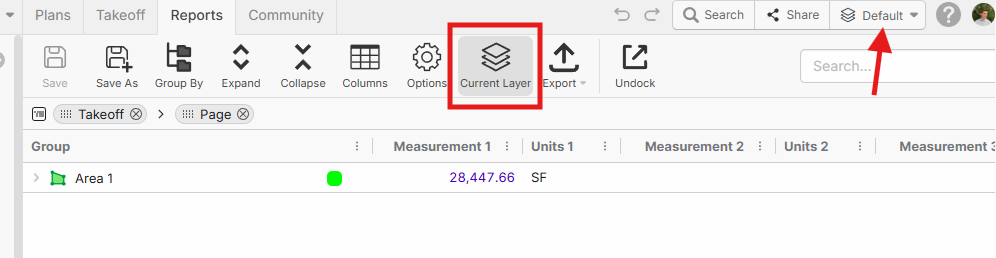
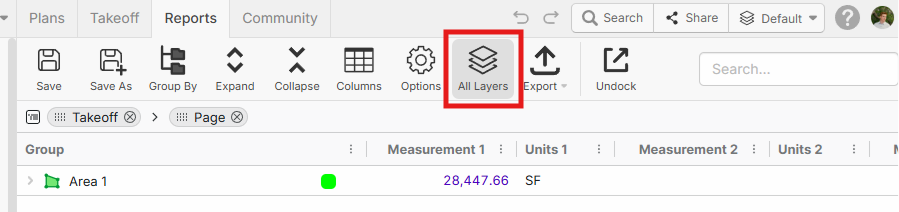
EDIT: Also, we will eventually allow the layers dropdown at the top to show "All Layers" or choose specific layers for visibility on the page, and that setting could apply to reports. Maybe it would be better to have Reports only show current layer by default and the button could be "All Layers" to enable showing data for all layers.
Love how you keep things simple!
I think this button will cover 90% of the "toggle/filter" challenges. Push it once, you see "ALL Layers" push it again it only goes to current layer. Yeah, this is the ticket. Default to current layer is my vote.
Also can't wait to see "all layers" on the actual PDF someday all together.
👍3🚀1%22%2F%3E%3Ctext%20x%3D%2232%22%20y%3D%2233%22%20text-anchor%3D%22middle%22%20dominant-baseline%3D%22central%22%20font-family%3D%22Arial%2C%20sans-serif%22%20font-size%3D%2226%22%20font-weight%3D%22600%22%20fill%3D%22%23fff%22%3EJ%3C%2Ftext%3E%3C%2Fsvg%3E "john")