










 Feature Requests
Hexdecimal Color Picking
I like to have the same takeoffs be the same color from job to job. It'd be nice to be able to type in the exact color. Also the ability to copy the colors of a takeoff when copying, but colors change when duplicating a takeoff like in OST. For example when taking off concrete i'd like all the footings to be yellow and walls to be red and slabs to be blue etc, so it'd be nice if I could just copy a slab takeoff and it remains the same blue, and i just change the description.

Aye….
+1

@Brisan,
You can do most of what your asking. Do the 1st two clicks and you will be happier I bet. Also I'll give you a gold star if you update our colors to our template to the colors you want in number 3.....any changes anyone makes there sticks for all.
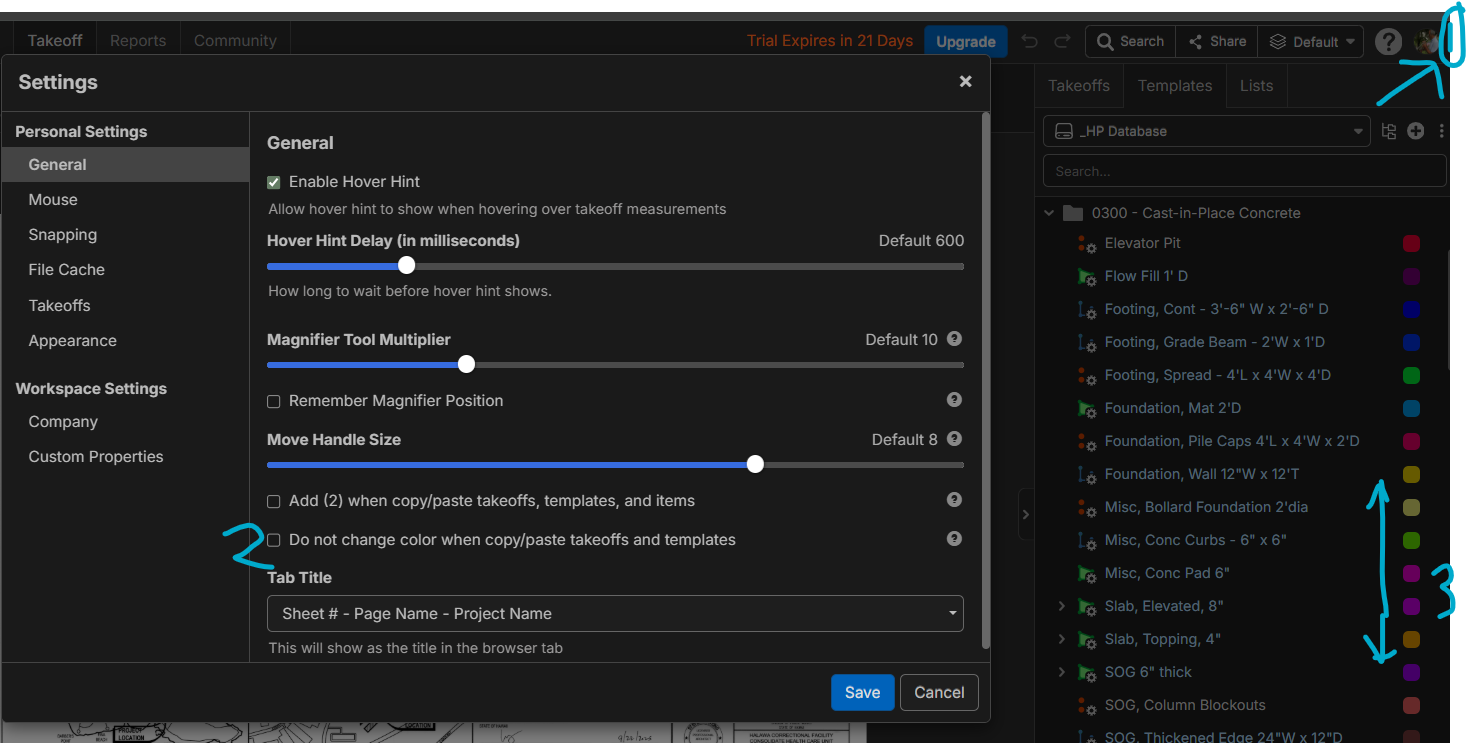

Hi, does Kyle's above solution work for you Brisan?

yes, for the most part. would be nice to be able to pick with hexdecimals, but that's just me being OCD.
👍2Agreed on being able to type HEX in. The not switching up color from one takeoff to another is somewhat helpful, but very conditional and I'm unsure if it will be more of a PITA to turn it on/off. For now, I'm having to count 3 over 5 down or remember HEX from one item and then ballpark the swatch area on the new existing/new item until I see the HEX code and then select.
I also would like to ask the question is it possible to highlight multiple takeoffs and change all items to same color? I keep running into this issue a lot of the last 8-9 months...
For instance, if I want to visually communicate (after the QTO has already been completed) that different items have been taken off, or may be on a certain level/elevation, or have different phase/trades, etc. Understood this can be done with folders/layers. Would be ideal to perform ctrl/shift+click items within reports or takeoff windows