Feature Requests
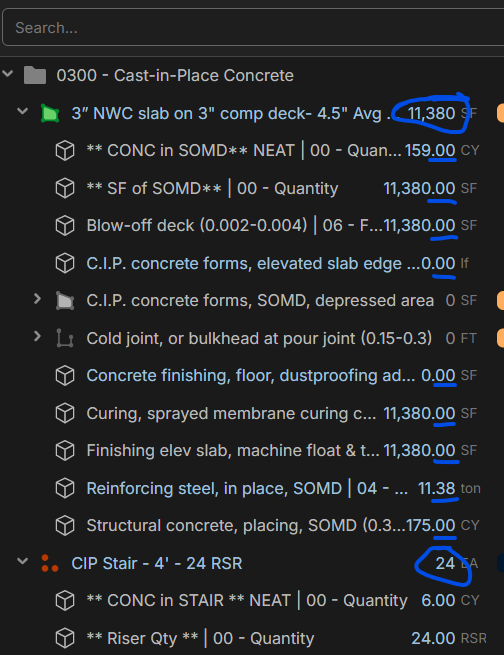
Feature Request: Down With the Decimals 🚫➗
I love this takeoff tool, but here’s the deal:
- All those decimals clutter up my view.
- When I paste into my estimating software, the decimals make even more clutter.
- Honestly, who enjoys fighting with .04 of a cubic yard?
Request:
When I click a quantity and copy it, give me the option to round it, just copy the clean, whole number. No fractions, no noise.
Even better give me a setting so I can not see any decimals in zzTO.
Imagine: one click, copy → 877 instead of 877.04.
That’s it. Clean. Fast. Done. 🙌
Let’s start a movement: Down with the decimals!!
%22%2F%3E%3Ctext%20x%3D%2232%22%20y%3D%2233%22%20text-anchor%3D%22middle%22%20dominant-baseline%3D%22central%22%20font-family%3D%22Arial%2C%20sans-serif%22%20font-size%3D%2226%22%20font-weight%3D%22600%22%20fill%3D%22%23fff%22%3EJL%3C%2Ftext%3E%3C%2Fsvg%3E "John L")
yea this would be nice. In bluebeam the feature is called "precision" and it's a drop down menu so you can chose what you want. Setting it to "1" means it will only show you whole number but you can choose from 1 to .00001. I also don't have use for dimensions so precise and usually just keep it on 1 for the quick and easy to read whole number
👍2%22%2F%3E%3Ctext%20x%3D%2232%22%20y%3D%2233%22%20text-anchor%3D%22middle%22%20dominant-baseline%3D%22central%22%20font-family%3D%22Arial%2C%20sans-serif%22%20font-size%3D%2226%22%20font-weight%3D%22600%22%20fill%3D%22%23fff%22%3EJ%3C%2Ftext%3E%3C%2Fsvg%3E "Jes")
The only time I need the decimals is when engineer provides exact dimensions that I have to follow for a wall. I've been using the report area to extract all of my takeoff figures these days so I wouldn't be that bothered if these got moved.
But while we're on the topic of discussing what shows up on the takeoff panel, when you have labor cost items you've added to a takeoff, I would really like a toggle or option of seeing the dollar amount right there on the panel instead of only being able to see those figures in reports.
👍4
Hey Kyle!
I think this is a great feature request. I'll pass it along to the development team.
👍3
Please add asap! When we export to our excel pricing sheet we require whole numbers. A precision setting is critical. Looking forward to this!
👍4

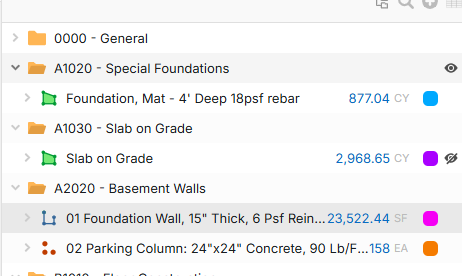
I know you deployed a company setting to address the takeoff decimals and working shown below.......but still want to kill the item decimals. Can this also be implemented? Pic of problem, as not it just looks funky with one of them working and the other not..... always round up to nearest 1 ideally.