










 Feature Requests
Add Option to have secondary measurement in Extract Schedule function
The Extract Schedule function is GREAT...
I used it to generate items for each room from the Room Schedule included on the drawings. I was able to get the area of each room in my building in just 2.5 hours.
What I need is the area AND the parameter, allowing me to export the wall lengths as well as the floor and ceilings areas to Excel.
I haven't found a way to change the select multiple items and change the Properties to add Linear / Perimeter to all of the selected items?.
Would it better to have the perimeter as a default secondary measurement or have a second Measurement Type (Area & Perimeter) for use in the Extract Schedule function?
I have a building with 170 rooms and was able to Extract the Finish Schedule and takeoff all of the areas in 2.5 hours. This is awesome, but it will likely take me an additional 1.5 hours to add Perimeter as a Measurement2 to all 170 items.
If you have questions, please feel free to follow up via email.
Thank you,
Jamey

Hi, thanks for the feature request! I have shared it with the dev team. This is tricky, it sounds like you are using a manual entered value for the takeoff quantity coming from extract schedule, and want to be able to set multiple manual entered values for a takeoff based on extract schedule (area and perimeter), is that what you are thinking here?
%22%2F%3E%3Ctext%20x%3D%2232%22%20y%3D%2233%22%20text-anchor%3D%22middle%22%20dominant-baseline%3D%22central%22%20font-family%3D%22Arial%2C%20sans-serif%22%20font-size%3D%2226%22%20font-weight%3D%22600%22%20fill%3D%22%23fff%22%3EJM%3C%2Ftext%3E%3C%2Fsvg%3E "Jamey Meints")
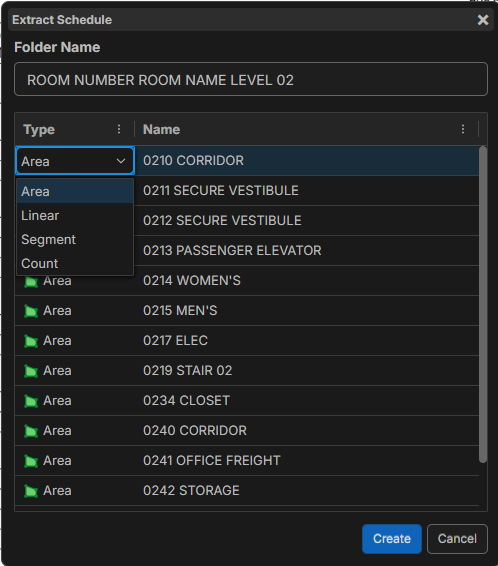
When extracting a Schedule, you have 4 options for type of quantity (see photo). I chose Area, as my end goal was to export each room SF area AND LF perimeter.
I was able to takeoff the areas, but needed to add a Measurement 2 to each of the 170 takeoff items (rooms).
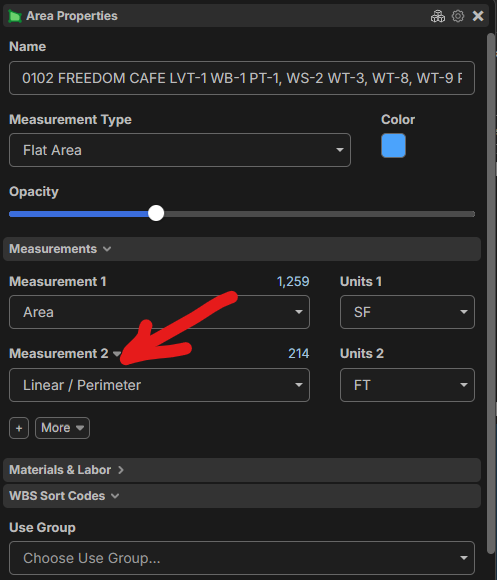
I could not find a way to add Measurement 2 to ALL of the conditions without opening the properties of each condition. This was 6 clicks per condition x 170 conditions or 1,020 clicks and took about an hour.
I was hoping that you could make mass changes to multiple conditions. Select a group, right click, and change properties. Similar to what your can do with the Update Properties:
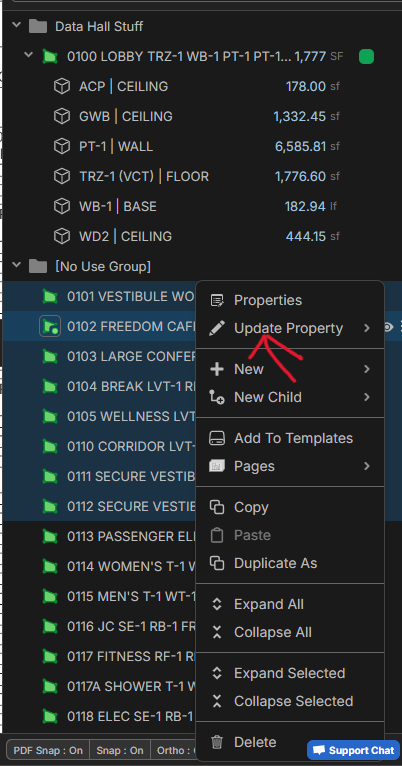
Thank you, that makes perfect sense! I will share it with the dev team.
👍1