Bug Reports
Takeoffs within takeoffs in Reports
When i have a takeoff within a takeoff, like in the example below:
Example:
- Foundation (Folder)
- Foundation Walls (Folder)
- 46" x 10" Foundation Wall (Takeoff)
- Integrated Rebar Column (Takeoff within 46" x 10" Foundation Wall)
In my reports tab, if i group by folder, the integrated rebar column will show up under only Foundation Walls folder when in reality it's under the Foundation folder and then Foundation Walls folder. See image below:
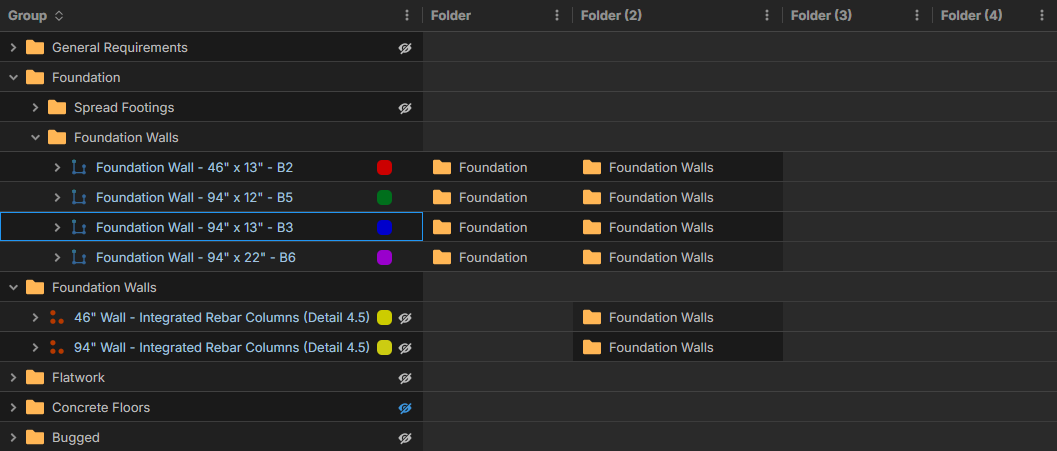
See the actual folder structure in my takeoff tab:
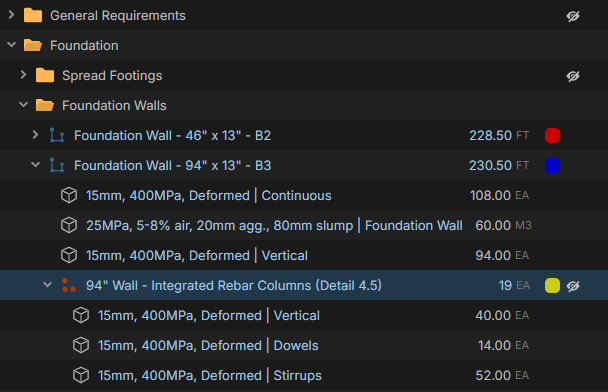
Not a huge issue, just confusing when going through the reports.

Hi, this is because on Reports it is grouping by Name. You could add the parent name ( [../Name] ) in front of the name of the child folder (after changing name type to Text with Tags), and this would result in different folder names, and cause them to group like you desire.
%22%2F%3E%3Ctext%20x%3D%2232%22%20y%3D%2233%22%20text-anchor%3D%22middle%22%20dominant-baseline%3D%22central%22%20font-family%3D%22Arial%2C%20sans-serif%22%20font-size%3D%2226%22%20font-weight%3D%22600%22%20fill%3D%22%23fff%22%3ESC%3C%2Ftext%3E%3C%2Fsvg%3E "Samuel C.")
Hi Stephen,
I’ve tried the fix you suggested, but it doesn’t resolve the issue.
The problem is that the folder structure works correctly for the Foundation Wall takeoff, but not for the Integrated Rebar Column takeoff, even though both are within the exact same folder structure.
In the Reports tab, the Foundation Wall reflects the hierarchy properly, but the Integrated Rebar Column does not. That’s what’s causing the inconsistency on my end.
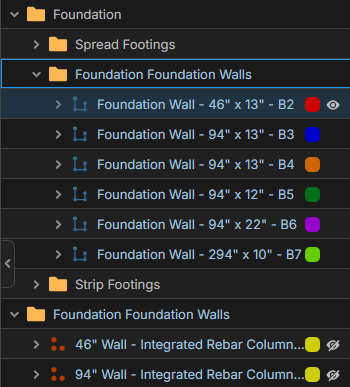
Here's what your proposed fix looks like on my end, the integrated rebar columns are still not within the parent folder (Foundation).
Gotcha, thats tricky because of the nested takeoffs. We do have another view we are working on called Takeoff Tree, where you can see the items as they exist (your first screenshot) and still have some grid editing features. I don't have a release date for you, but it sounds like this could help with your goal once released.

@Samuel, we just released the new Takeoff Tree report & we also did some bug fixes to the Folder 1 column. Does the Takeoff Tree report display the information as you would expect?