










 Bug Reports
Takeoff Sorts into Wrong Custom Properties WBS Spot
I have heavily adopted using the sum feature in a manual takeoff for takeoffs that should total up; and I have noticed that if you add a takeoff from your templates after using one of the takeoffs that sums up into the manual takeoff it will add the template item into this 'group' instead of where it should be organized via the predefined custom properties WBS.
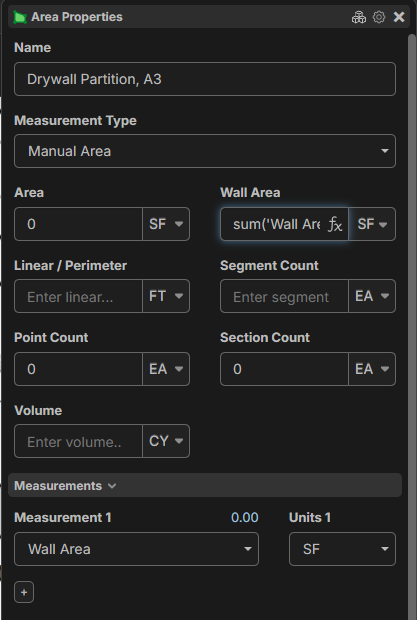

After using the linear takeoff above and ending the action if you add a takeoff via the template pane or the quick command platte
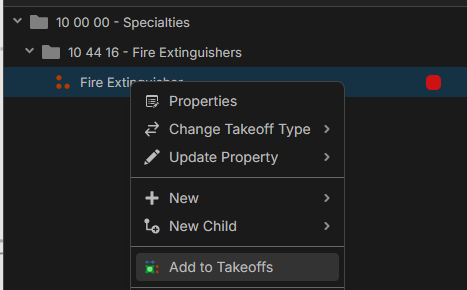
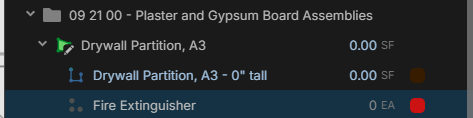
This Fire Extinguisher takeoff should have been imported into my takeoff panel under my custom properties WBS 10 00 00 - Specialties > 10 44 16 - Fire Extinguishers, but instead gets slotted under the manual takeoff with a sum formula in it.

Thanks for reporting! I think this is because you had the "Drywall Partition" takeoff selected when you added the template to your takeoffs, and the new template was added underneath the takeoff. We'll get this patched 🙂
%22%2F%3E%3Ctext%20x%3D%2232%22%20y%3D%2233%22%20text-anchor%3D%22middle%22%20dominant-baseline%3D%22central%22%20font-family%3D%22Arial%2C%20sans-serif%22%20font-size%3D%2226%22%20font-weight%3D%22600%22%20fill%3D%22%23fff%22%3EVT%3C%2Ftext%3E%3C%2Fsvg%3E "Victor Tengowski")
Yeah, this one was a bit difficult to explain. It took me a while to be able to reproduce it. I've been running into it repeatedly with the adoption of the manual quantity sum workflow.
Thanks for all the work the team does!
Coming back to this. I've noticed perhaps a clearer pattern that might help debug this.
If you have recently edited a child item/part/takeoff of a takeoff and then go to add a takeoff from your templates it will put the added takeoff in as a child item/part/takeoff of the takeoff you were recently editing.
You can see it happen in this YouTube video. After Kyle edits the the 'Base - Rubber' child item and then goes to add another takeoff from his templates it adds it as a subitem rather than following the WBS he has set up.
I find this rather annoying and a bit frustrating when I notice it happen, and it happens multiple times a project QTO.
👍1