










 Bug Reports
[Formula error] Calculated variable when multiplied
Hi,
When I multiply the variable, I get different results.
Here is an example of a simple formula:
[variable] * 0.3048
If variable = integer, no error
If variable = calculated number (such as 1+1+1), incorrect result
However, if I check what the variable is, and if it’s a calculated value, it gives me 3 (1+1+1), but if I then multiply the calculated variable, the results are incorrect.
I didn’t used to have this problem in my formulas; I just noticed it by chance.
Thanks

Here are some more examples
Formula: [variable] * 2
Variable = 2; result: 4
Variable = 1 + 1; result: 3
Variable = (1 + 1); result: 4

Hey Fred, thanks for reporting. We're digging into this. Could you send some screenshots of your setup? I haven't been able to replicate these results unless I used text mode or "Text With Tags" mode on a custom property.
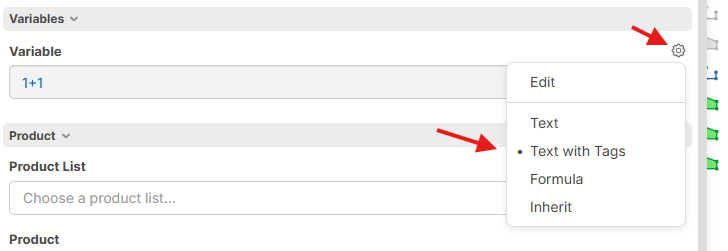
The math looks like it checks out for your example if you were using Text/Text with Tags:
Variable = 1 + 1
Formula = [variable] * 2
Tag replaced Formula = 1 + 1 * 2
Result = 3
Maybe its from the dropdown then...
My variables comes from a dropdown menu than i allow editing.
Dropdown mode : Name
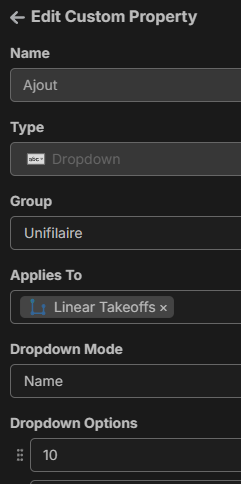
Then, no matter where I use these calculated values, the formula will be incorrect.
The dropdown :
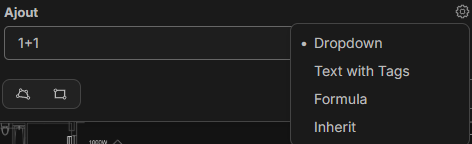
Formula (in a child item propreties):


Gotcha. In this case, the dropdown is not calculating 1+1 before it gets inserted into your description because the mode is "Dropdown", which is equivalent to the text mode. The mode "Formula" does, though.
In this case, I would either recommend switching your property "Ajout" to "Formula" mode when you use math on the property (like 1+1) or to wrap your variable in parentheses anytime you reference this property - "([Ajout])", so the order of operations calculates correctly.
🎯1👍1