










 Bug Reports
Custom Icons/Symbols Displaying Incorrectly on Imported Projects
So this is a very niche issue but I wanted to let you guys know about it. I use custom icons/symbols in some of my takeoff items and they don't display properly in zzTakeoff BUT, this only happens on imported PlanSwift jobs. Any new takeoff items I create don't have this issue.
For example, I have fractions and degree symbols for elbow fittings and they just show up as question marks as seen below.
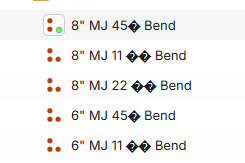
These are what the text should say:
8" MJ 11 ¼° Bend
8" MJ 22 ½° Bend
8" MJ 45° Bend
Like I stated above, this is not a big issue by any means and as far as I can tell, has only happened with imported projects. I know you guys are still working on the imported jobs side of things and that issues are to be expected so I wanted to let you know about this one.
Thanks!


Thanks for reporting. We will dig into this.
Do you have a sample export that you can email to us at support@zztakeoff.com for us to test import? If you are able to send it, just let them know to relay it to the development team.
👍1%22%2F%3E%3Ctext%20x%3D%2232%22%20y%3D%2233%22%20text-anchor%3D%22middle%22%20dominant-baseline%3D%22central%22%20font-family%3D%22Arial%2C%20sans-serif%22%20font-size%3D%2226%22%20font-weight%3D%22600%22%20fill%3D%22%23fff%22%3ETS%3C%2Ftext%3E%3C%2Fsvg%3E "Teddy Schwartzhoff")
We released an update which we believe solves this. Is it working properly for you now?
Nope, still having the same issue. Tried importing the same job file that I sent you guys along with another different job and both shows the question mark things instead of the icons.
Dang. We will check again.
Hi Teddy. We just released another patch. Is it working properly for you now?
Yessir! Worked perfectly this time. Thank you!
Excellent! Glad to hear it. Thanks for working with us to get it fixed 🙂
🚀1